It was Friday.
There was a bug.
The app displayed:
[object Object]
Very informative.
Patch saved us from submitting a new binary..
And got us to the pub on time to meet the most beautiful girl in the room, in the whole wide room…
That was the short version.
Here is the rest.
Microsoft retired App Centre and CodePush in March 2025.
CodePush had been the usual React Native answer for sending JavaScript updates without waiting for another app-store release.
Codemagic did not let it die quietly.
They kept a CodePush fork alive for 18 months and pushed billions of updates through it.
Every update check hit the server.
Diffs worked file by file, so a one-line fix could still mean re-shipping the whole bundle.
Release history lived in one JSON file that only ever grew…
And nothing checked whether a bundle actually matched the binary it landed on.
You cannot “patch” that (pun, very much intended).
So they rewrote it.
Codemagic Patch is the result.
A self-hosted OTA system with a server, release worker, React Native SDK, Expo config plugin, CLI and web dashboard.
You provide the box.
Patch fetches the bundles.
Good doggo!
Patch, Running On Your Laptop
We used Patch’s local evaluation stack, which runs the real server, worker, PostgreSQL database, MinIO storage and dashboard through Docker Compose (Docker Compose is the tool that reads one YAML file and starts every service in it at once, so the whole stack comes up with a single command instead of five terminal tabs).
The local setup requires Docker with Compose v2 and Node.js 22 or newer.
First, install the SDK:
yarn add @codemagic/react-native-patch
Then add the plugin to app.json:
{ "expo": { "plugins": [ [ "@codemagic/react-native-patch", { "ios": { "deploymentKey": "ios-staging-deployment-key", "apiUrl": "http://localhost:3000", "downloadBaseUrl": "http://localhost:9100/codemagic-patch" }, "android": { "deploymentKey": "android-staging-deployment-key", "apiUrl": "http://10.0.2.2:3000", "downloadBaseUrl": "http://10.0.2.2:9100/codemagic-patch" } } ] ] } }
Look at the Android URLs.
Inside the Android emulator, localhost points back to the emulator.
To reach your computer, you need 10.0.2.2.
Use localhost there, and you will spend ten minutes blaming Patch.
Bad doggo! Ask me how I know.
Next, call sync() near the top of the app:
import { useEffect } from "react"; import { sync } from "@codemagic/react-native-patch"; export default function App() { useEffect(() => { void sync(); }, []); return <Jameet />; }
Then regenerate the native projects:
npx expo prebuild
Expo Go is out because Patch includes native code.
Debug builds also load JavaScript from Metro, so you need a release build to see an OTA update applied.
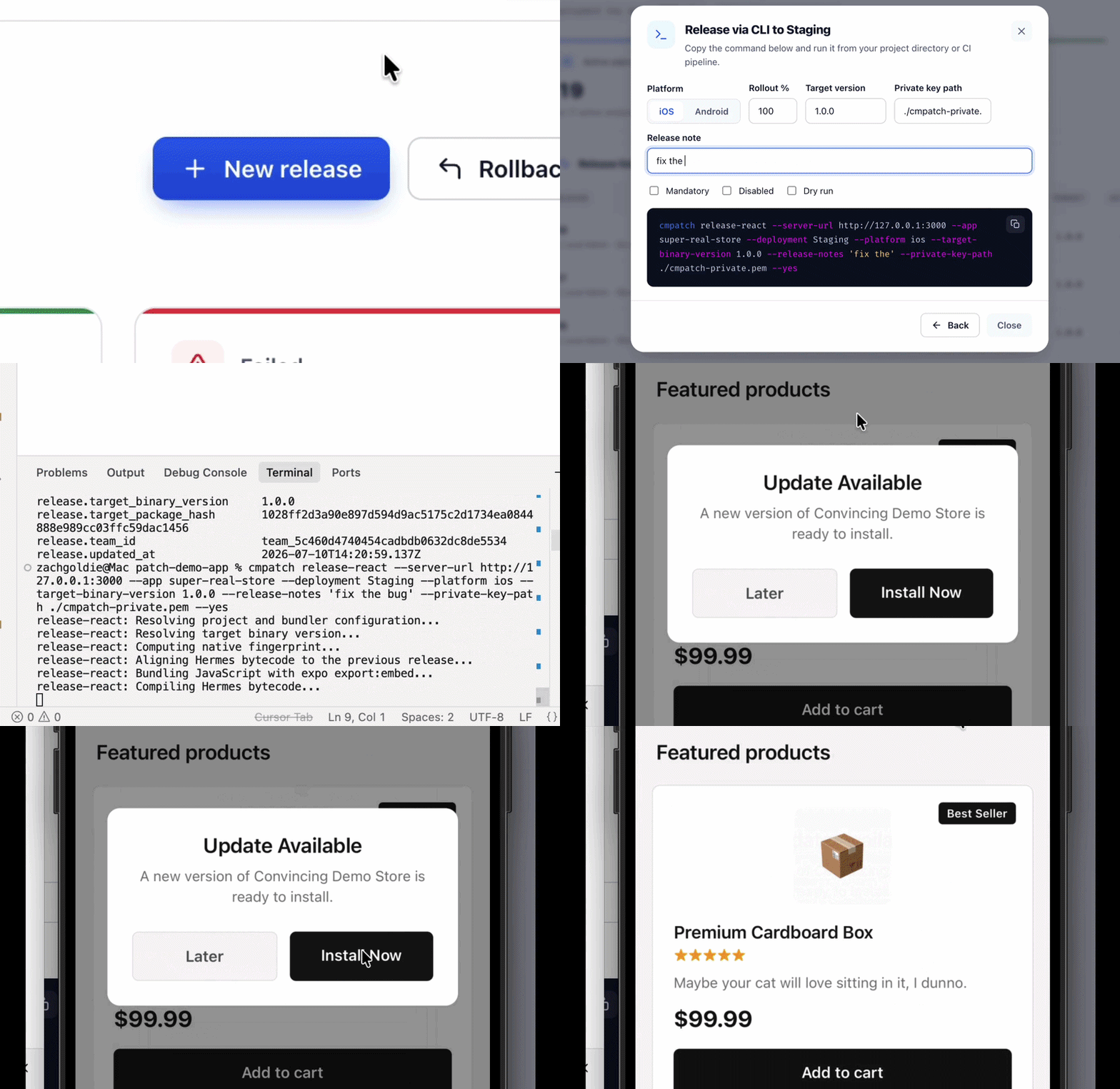
After that, publishing is one command:
cmpatch release-react \ --app jameet-ios \ --deployment Staging \ --platform ios
The CLI bundles the JavaScript, calculates the native fingerprint and target binary version, then uploads the release.
Mission Control for Typos
The dashboard shows your apps, their Staging and Production deployments and the releases inside them.
Open a release to see its target binary, native fingerprint, rollout percentage, package signature, processing status, and metrics.
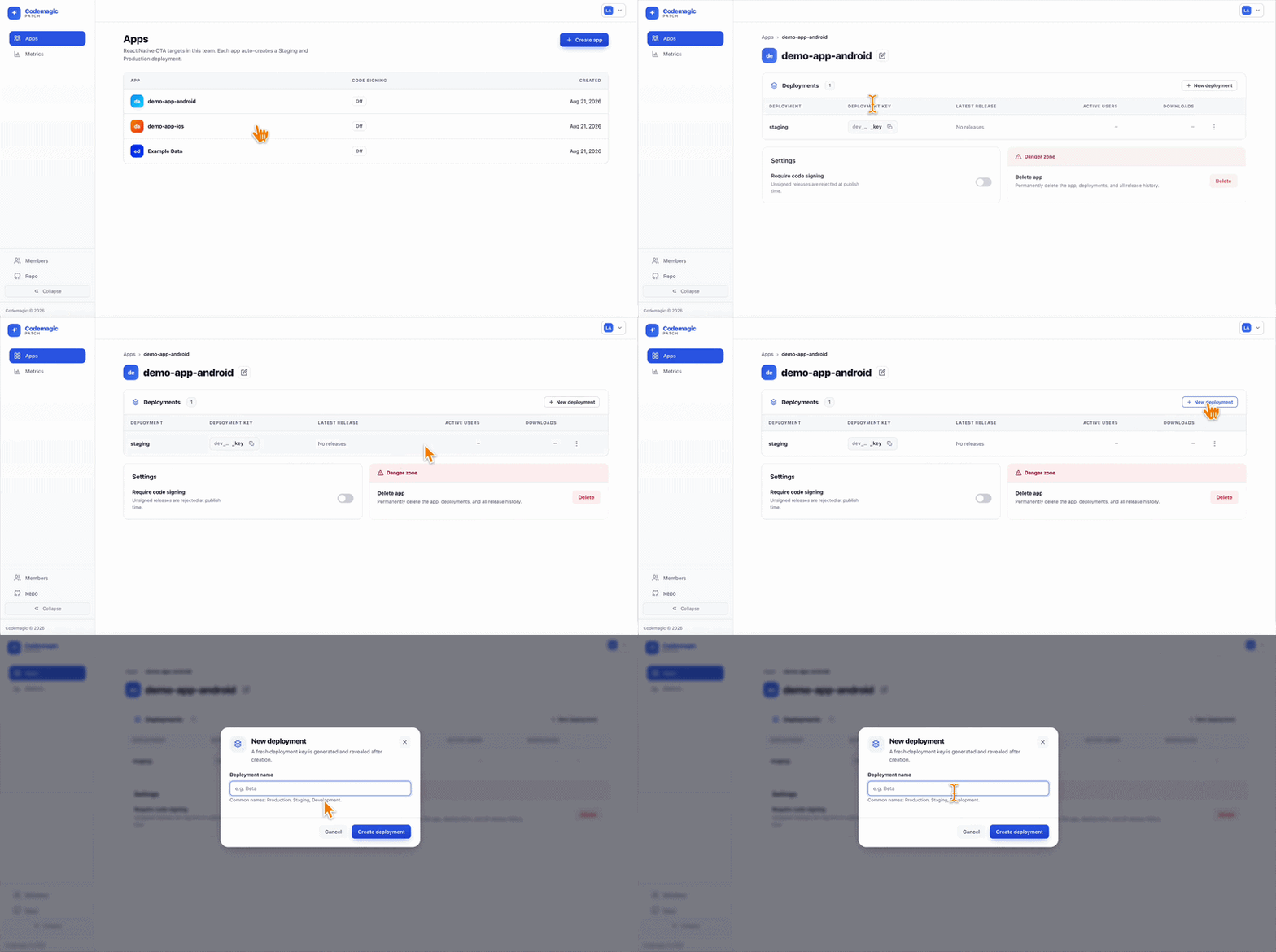
You can promote it to Production, disable it or roll it back.
Patch also supports gradual rollouts:
cmpatch release-react \ --app jameet-ios \ --platform ios \ --deployment Production \ --rollout-percentage 10 \ --release-notes "Please do not ruin Friday"
Start at 10%.
Wait a little…
Make a coffee… or an adaptogenic mushroom cacao, if you are into that…
Check the metrics.
If nothing catches fire, continue.
There is also automatic rollback protection.
When sync() runs, it marks the current bundle as healthy.
If a newly installed bundle crashes before reaching that point, Patch restores the previous known-good bundle the next time the app launches.
The Interesting Bit Is A JSON File
Now for the part we actually like.
First, pretend that you are rich…
Then pretend 100,000 users open your app after you announce an update.
That is 100,000 phones asking:
“Anything new?”
A common setup sends each check through an API.
The API checks a database and sends the answer back.
Patch does not use its API for that.
According to Patch's PROTOCOL.md:
"The client never asks the control-plane (the server side that manages publishing, teams and metrics, as opposed to the pipes that carry your bundles) API whether an update exists."
Instead, the release worker writes static manifests to object storage.
Puts a CDN (a Content Delivery Network caches your files on servers worldwide, so users download from the closest one instead of your origin server) in front of that storage, and the update checks can be answered at the edge.
An update check asks one question…
Is there a newer bundle for this exact device?
Patch answers it without a database lookup.
When you publish a release, it writes the answer ahead of time as a file at a path that describes exactly who it’s for.
So the device does not ask a server.
It works out where its own answer would live, and fetches it.
The path is built from three things the device already knows:
/{deployment_key}/{binary_version}/{package_hash}/manifest.json
Which channel it is on, which native binary it is running, which bundle it has right now.
Filled in, that is:
/ios-staging-key/1.4.0/8f2a91c/manifest.json
If that file exists, there is a newer bundle:
{ "downloadUrl": "...ios-staging/9d4b02e.zip", "packageHash": "9d4b02e", "isMandatory": false }
If it 404s, the device is already current.
Nothing to do.
The nice part is that every device on Staging, running 1.4.0, sitting on bundle 8f2a91c, asks for that same path.
One of them warms the cache.
The rest are served from the CDN, not your server.
So what is that worth?
Codemagic supplied a benchmark comparing a Patch manifest delivered through Cloudflare R2 with the default HotUpdater Cloudflare setup, a Worker plus a D1 database.
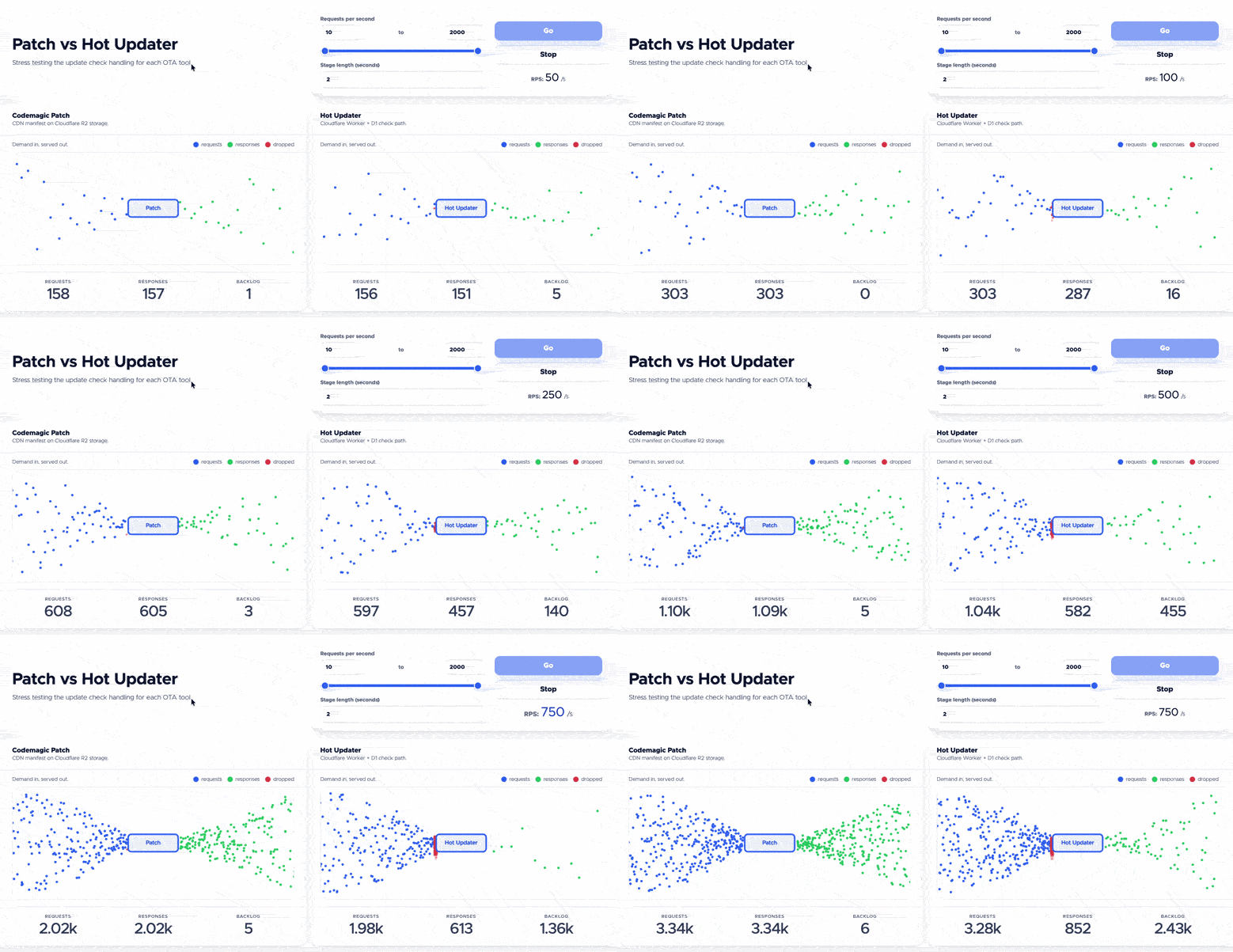
Codemagic tested both approaches at 1,000 requests per second. Patch handled all 6,331 requests in the test. The database-backed alternative completed 564, while the other 5,767 remained queued.
The benchmark targeted HotUpdater's default Cloudflare setup, not HotUpdater generally, which is plugin-based and can also store its metadata as JSON in S3 served through CloudFront.
The test measures CDN delivery against database querying.
Which is the difference between answering a question once and answering it a hundred thousand times.
Finally, Saving $3,774 A Month, Sort Of
Before the numbers, the usual caveat. These estimates are based on public list prices. Enterprise agreements, committed spend and regional rates all move the figure, so what follows is the shape of the difference, not a quote.
EAS Update is Expo's OTA service, and if you are shipping JavaScript updates today, odds are you are already paying for it.
One of these bills you per user.
The other bills you nothing and sends you an invoice from DigitalOcean.
With EAS Update, none of the infrastructure is yours. Expo hosts the update service, stores your bundles and serves them from its own CDN.
At the time of writing, Expo includes:
- 1,000 updated monthly active users on Free.
- 3,000 on Starter at $19 per month.
- 50,000 on Production at $199 per month.
Past that, pricing is graduated, starting at $0.005 per extra user and dropping as you scale.
Each extra user also brings 40 MiB of edge bandwidth, so most apps never see a bandwidth line.
Patch is self-hosted.
Under Codemagic's server licence, your own apps are free up to a million monthly active users. Above that, commercial pricing starts at $990 per million users per year and drops in bands after 50 million.
A free licence does not pay your server bill.
The machine, the storage, the CDN and the 3 a.m. alerts are all yours.
Pretending otherwise is how you lie to your own spreadsheet.
So, real numbers…
A million updated users on EAS Production comes to $3,774 a month.
That is the Production list price. At that scale, Expo may move you to Enterprise, which includes the first million users in its base price and lists that price as Custom.
The same million on Patch is $0 in licence fees, one modest server, and roughly five terabytes of bundle egress, which is free on R2 and a few hundred dollars on CloudFront.
That assumes R2, where egress is free at any volume.
On CloudFront, you pay roughly $0.085 per GB, so a million users pulling a 5 MiB bundle comes to a few hundred dollars (4,883 GiB at $0.085 per GB is about $415).
So, What's It Gonna Be?
With Patch, you still host it yourself, but you get the server, dashboard, metrics, staged releases, binary diffs, gradual rollouts and rollback behaviour as one system.
And… drumroll….
There is a giveaway on Discord.
A year of unlimited builds on M2 Macs, Codemagic's Annual plan, worth $3,990.
To enter…
👉 Join the Discord before September 14th.
No forms…
No retweets…
No tagging three colleagues who tolerate you.
Anyway.
Native change?
Build the binary.
JavaScript typo?
Patch it.
Now… how about a Guinness?
This article was sponsored by Codemagic.