
(We're the Millers - Wait, You Guys are Getting Paid)
Therapy, Now on a Terminal Near You
These days…
If you are a Fortune 500 company and do not have your own terminal-based coding agent.
Then who even are you?
The edgiest and potentially conscious, Grok, now has its own TUI (Text-based User Interface), which is a fancy way of saying a full-screen, mouse-interactive terminal interface for coding with AI agents. It’s Claude Code but for Grok. It’s called Grok Build.
Once installed, you can easily run it with:
grok
And then just like Claude Code, you can have it complete tasks, help you plan features, or be your terminal therapist for the evening.
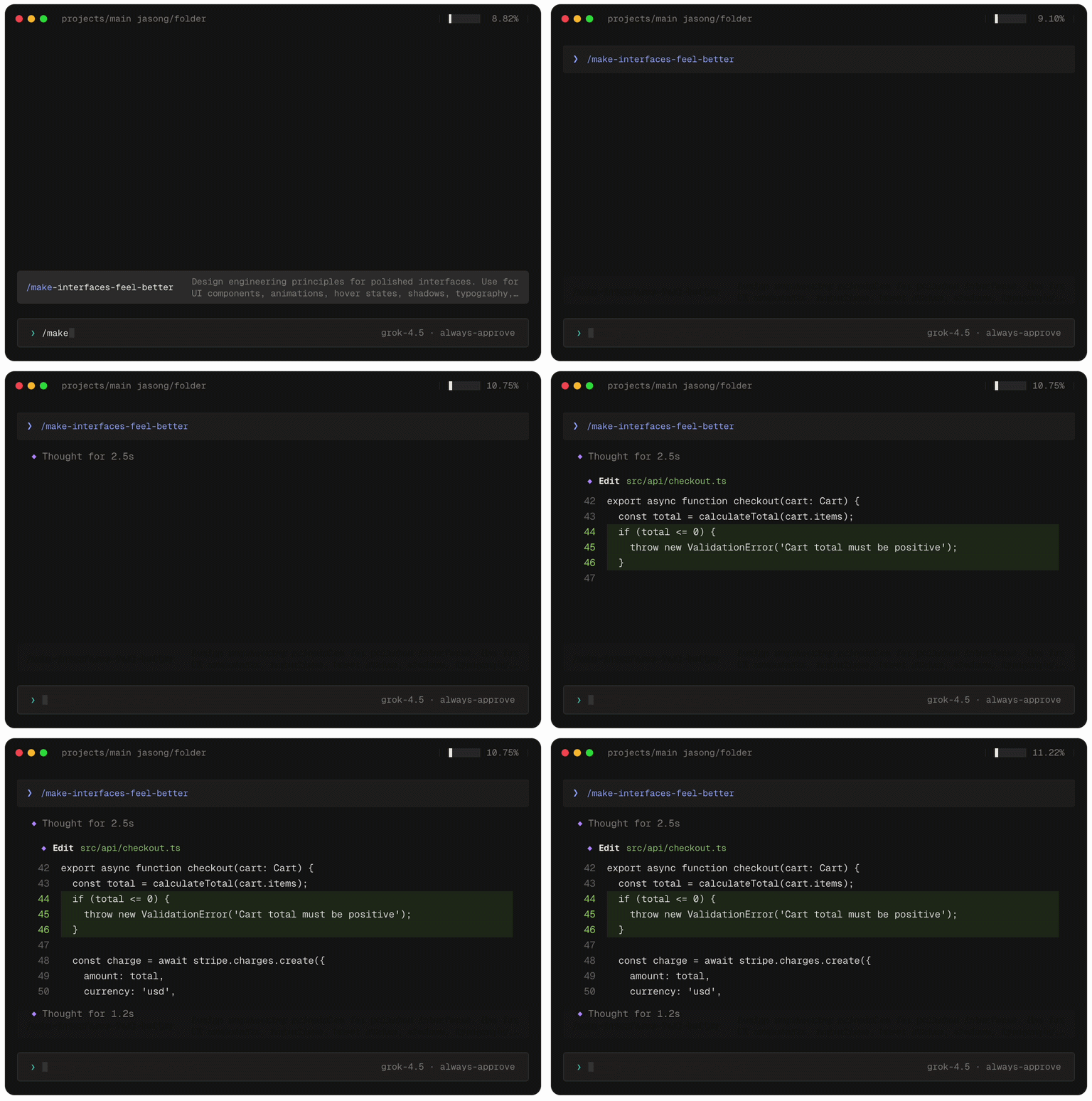
No judgement, this is a therapy-positive space.
Even if your therapist is ChatGPT.
So, the question you may be asking… is…
Why would I install this "I am Grok" CLI tool when I am very comfortable using Claude Code or Codex?
Well… like everything in life, it all comes back to a blue checkmark.
If you already pay for the checkmark formerly reserved for heads of state, now available to anyone with €8 and a dream, then you can use the subscription to run Grok Build.
And since most developers have X, and we love to flex with those blue checkmarks and X-related perks, you may be able to save yourself the $20/month Claude Pro or Codex subscription.
Now, you may run into your usage limits pretty fast.
And then there is nothing worse than hitting your usage limits at the point of unravelling your 8th-grade trauma.
I’m speaking from experience.
Let Your Agent Use the App It Just Built
Your coding agent writes a login screen, tells you it's done, and moves on.
It never actually opened the app.
The Maestro MCP fixes that.
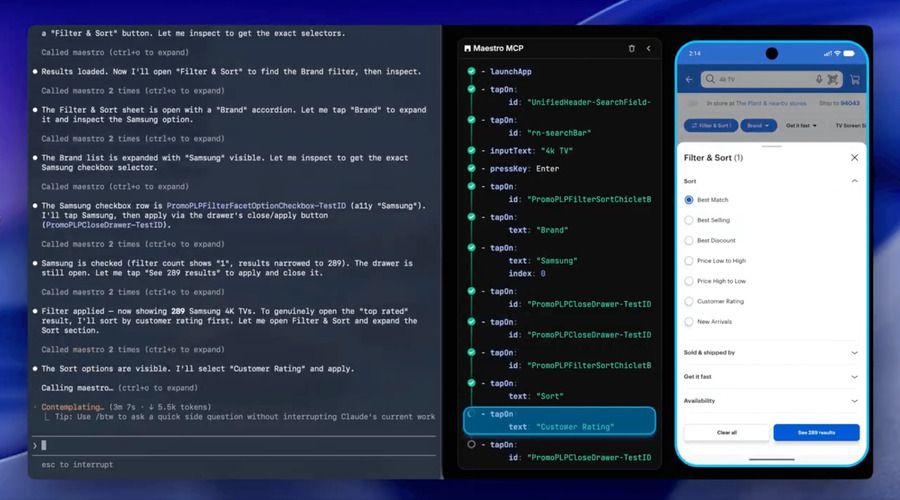
It hands your agent an iOS simulator, Android emulator, or physical Android device to drive.
Your agent reads the screen hierarchy, taps through the flow, grabs screenshots, and confirms the feature it just wrote actually works. Then it saves a repeatable end-to-end test, so the same flow doesn't quietly break next week.
The Maestro Viewer embeds the live device right inside your coding agent, showing every command as it runs.
It all ships inside the Maestro CLI.
Point Claude Code, Cursor, Codex, Copilot, or Gemini at it. For Claude Code, it's one line:
mcp add maestro -- maestro mcp
Your agent stops saying "this should work" and starts checking.

The App at the End of the App Store
Here is a sensitive question…
In the future, will mobile apps even exist?
Or will everything be hidden behind a chat interface somehow?
And connected via Generative UI (interfaces that an AI builds on the fly for whatever you're doing, instead of fixed screens designed in advance) and MCP servers (a standard way for AI models to plug into external tools and data).
We have already seen this direction unfolding with MCP and Skills.
For example, you can connect tools such as Stripe, Sentry, Vercel, and more to Claude Code or the AI tool of your choice.
This means that when you want to analyse that financial data against your latest deployment, generate an invoice, or inspect the production logs, you no longer need to go to the service.
You just do it via your Chat interface.
Increasingly, development is done in a single chat interface, where all the data is available via the Chat.
Appless is an experiment that takes that one step further.
They envision that one day you will open your iPhone and everything will be there, such as booking your next trip, buying groceries, or connecting with that cutie on Tinder building a genuine connection with someone over the internet.
But here's the twist: Appless doesn't answer with chat bubbles.
It answers with a screen.
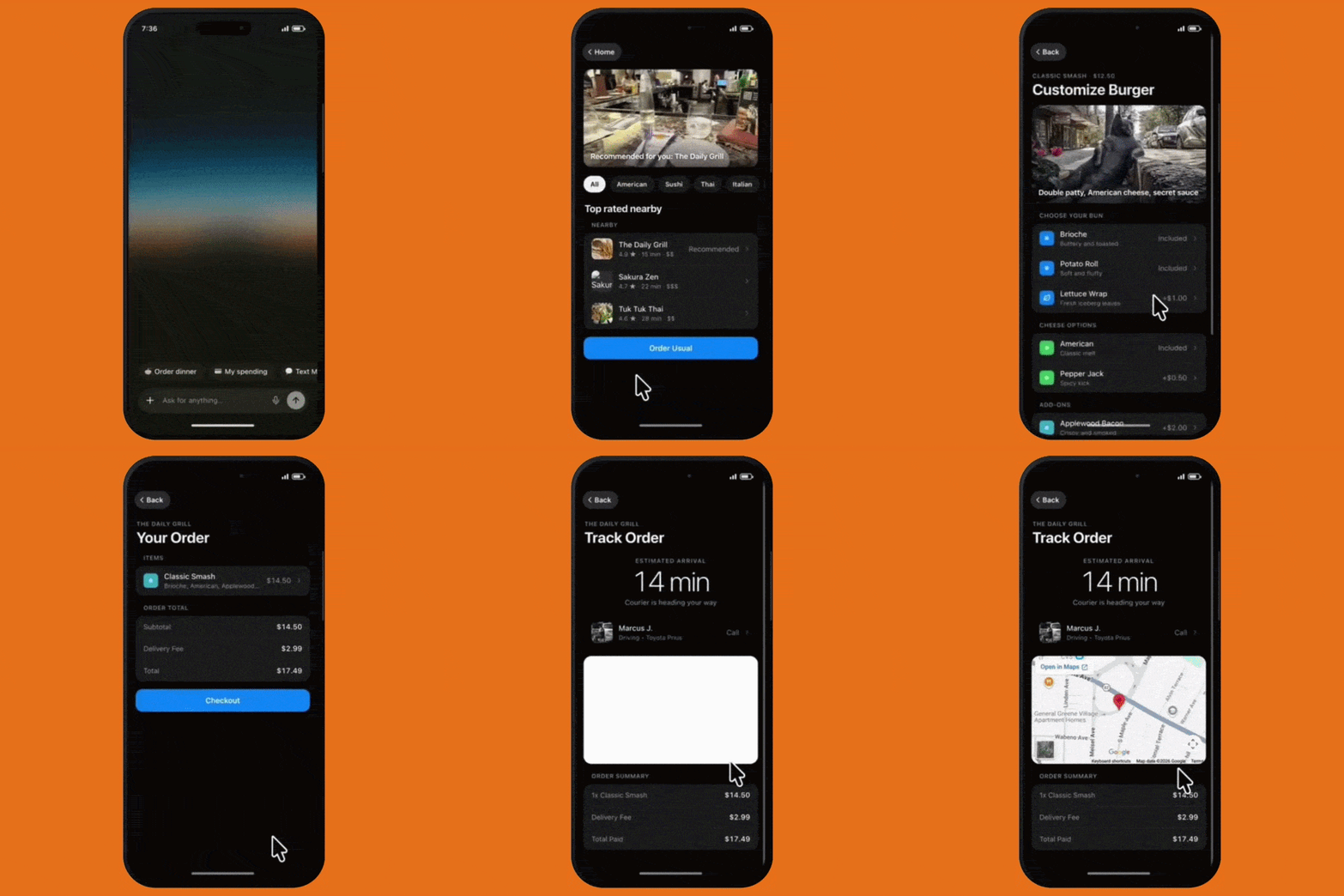
Ask for restaurants nearby, and the model streams back a real native list view, Cupertino (the iOS design language, as Flutter folks call it) on iOS, Material 3 on Android, rendering live before the response has even finished.
It comes from Thesys, the folks behind OpenUI, an open standard for LLM-generated interfaces.
Instead of returning JSON or plain text, the model writes openui-lang (a compact, streaming-first UI language) that the OpenUI renderer renders as live native components as tokens arrive.
// openui-lang: what the model streams // instead of JSON or chat text root = Stack([weather]) // components reference other lines by name weather = Card([title, temp]) title = CardHeader("Madrid", "Saturday") temp = Text("31°C and sunny")
Appless is essentially their proof that the standard can carry an entire phone.
But WAIT… don’t delete the kisses all your apps just yet.
Appless is a demo with no real integrations.
The content can be grounded in real data via a web search tool, but every action is simulated.
"Order placed" places nothing… eh… OK…
"Payment sent" sends nothing. Womp Womp!
Which, to be fair, also describes our last three side projects… and relationships.
The maintainers are upfront about it and are inviting forks that wire in real services, for example, DoorDash for food, Plaid for banking, and Spotify for music.
So the app at the end of the App Store is fully designed, beautifully rendered…
And waiting on one small detail.
Someone else has to build it.
👉 Appless

Toto, Pull Back the YAML
You know, back in 2021, when everyone was using Detox.
They are not anymore.
Why?
Well… It's not just because Maestro sponsors us, but…
Detox's synchronisation relies on detecting when the app is "idle" (no pending network requests, timers, animations, or JS work). Anything it can't see or track correctly, like Reanimated worklets running on the UI thread, WebSockets, or polling, can make it think the app is busy forever or idle when it isn't.
Maestro doesn't try to model what "idle" means in your app. It just polls the accessibility tree until the expected element appears or a timeout occurs.
UH! Anyways, we are going down a rabbit hole.
Roasting Detox is not why we are writing this.
We want to tell you about the Maestro MCP (Model Context Protocol, an open standard for connecting LLMs to external data sources, tools, and services).
So instead of writing tests manually… BORING!
Who even writes anything anymore…
You can have Maestro MCP create test flows from natural language.
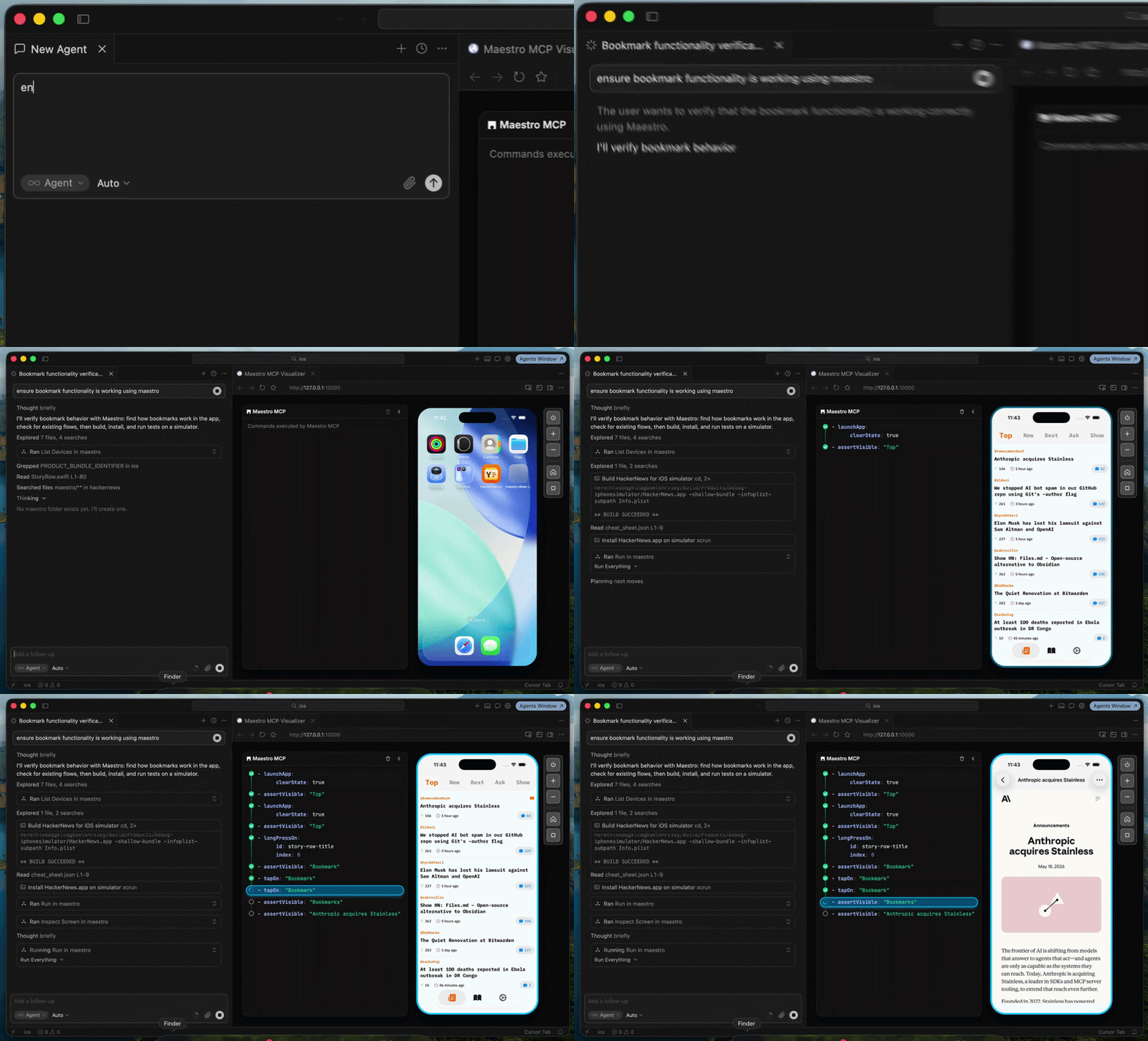
So gone, GONE, are the days of ever needing to manually write a test flow.
You just described it. "Make sure the superlike works on Dinder, my Tinder for dogs clone." Your AI tool, with the context of your codebase, uses Maestro MCP to build out a test flow for what you asked.
Maestro MCP also ships with a viewer, so instead of your agent running a flow behind the curtain, like you're in some cyberpunk Wizard of Oz.
Pay no attention to that man behind the curtain!
You can actually see the tests that Maestro MCP is running and building.
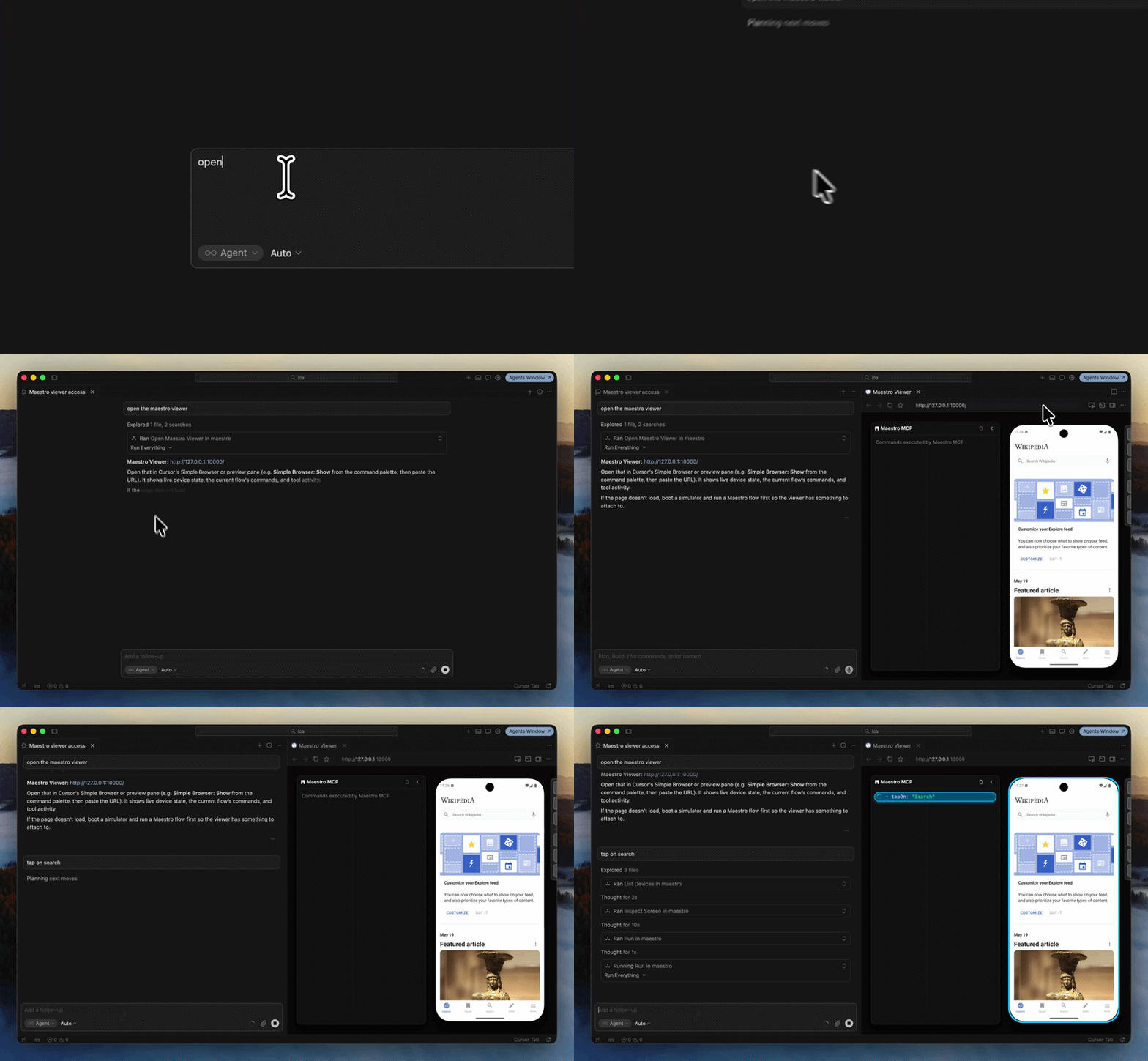
So this opens up some exciting possibilities.
Either Maestro MCP writes your YAML flows from plain English, or there's the possibility of building QA loops that write tests on the fly, potentially from PR descriptions and code diffs, and tests that self-heal.
We may be approaching an era where the QA bottleneck, the one that's plagued teams since the dot-com bubble, is finally starting to crack.
This section was sponsored by Maestro.