Hey, I Just Met You? Fold Me Maybe
The world has become a weird place….
Agents now write your code.
Thieves robbed the Louvre in broad daylight with a furniture lift, in under eight minutes…
And the password to the museum's surveillance system was reportedly "LOUVRE".
But none of that is the weirdest news of the year…
Apple has introduced a foldable phone.
The iPhone Duo shipped on October 23rd.
So anytime today, someone can open your app on a 7.6-inch screen with a crease down the middle and fold it halfway like a tiny laptop.
Android devs have lived with this for years…
Now it's everyone's problem.
Like the U2 album Apple put in every iTunes library in 2014.
So how do you build a layout that knows it's been folded?
Thiago Brezinski (@thiagobrez) built react-native-arrangement-view, which is a two-pane layout that rearranges itself as the device folds, unfolds and rotates.
You give it a primary and a secondary pane:
<ArrangementView style={{ flex: 1 }} arrangement="split"> <ArrangementView.Primary> <PrimaryPane /> </ArrangementView.Primary> <ArrangementView.Secondary> <SecondaryPane /> </ArrangementView.Secondary> </ArrangementView>
So what does that actually look like?
Let's examine the two panes on the iPhone Duo, folding them one at a time.
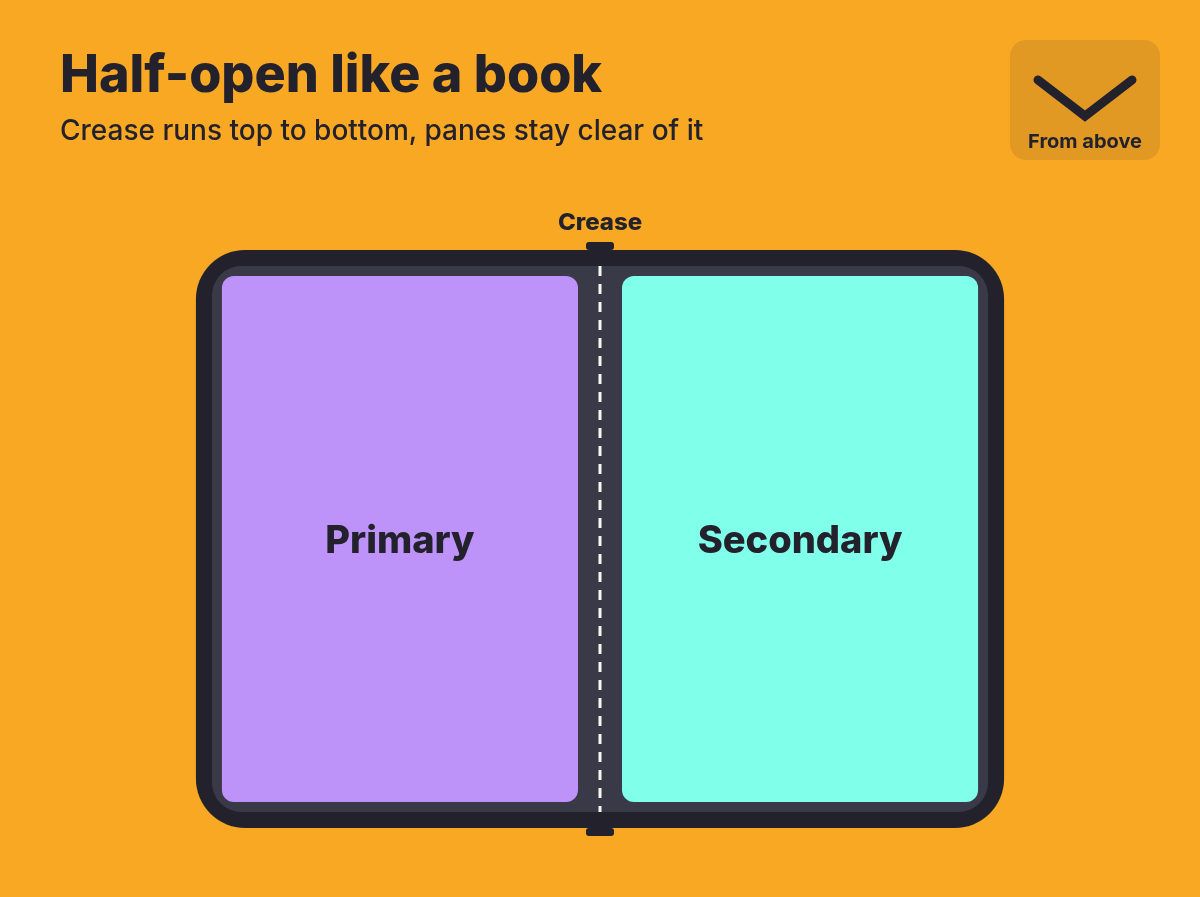
When the Duo is Closed, it is folded shut and in this case you use the cover screen (that is, the small screen on the outside which you use when the phone is shut).
If you keep it vertical, the height will accommodate two panes, meaning that the main pane will be on top and the other pane will be below.
If you turn it sideways, only one will fit, so you end up with the primary pane.
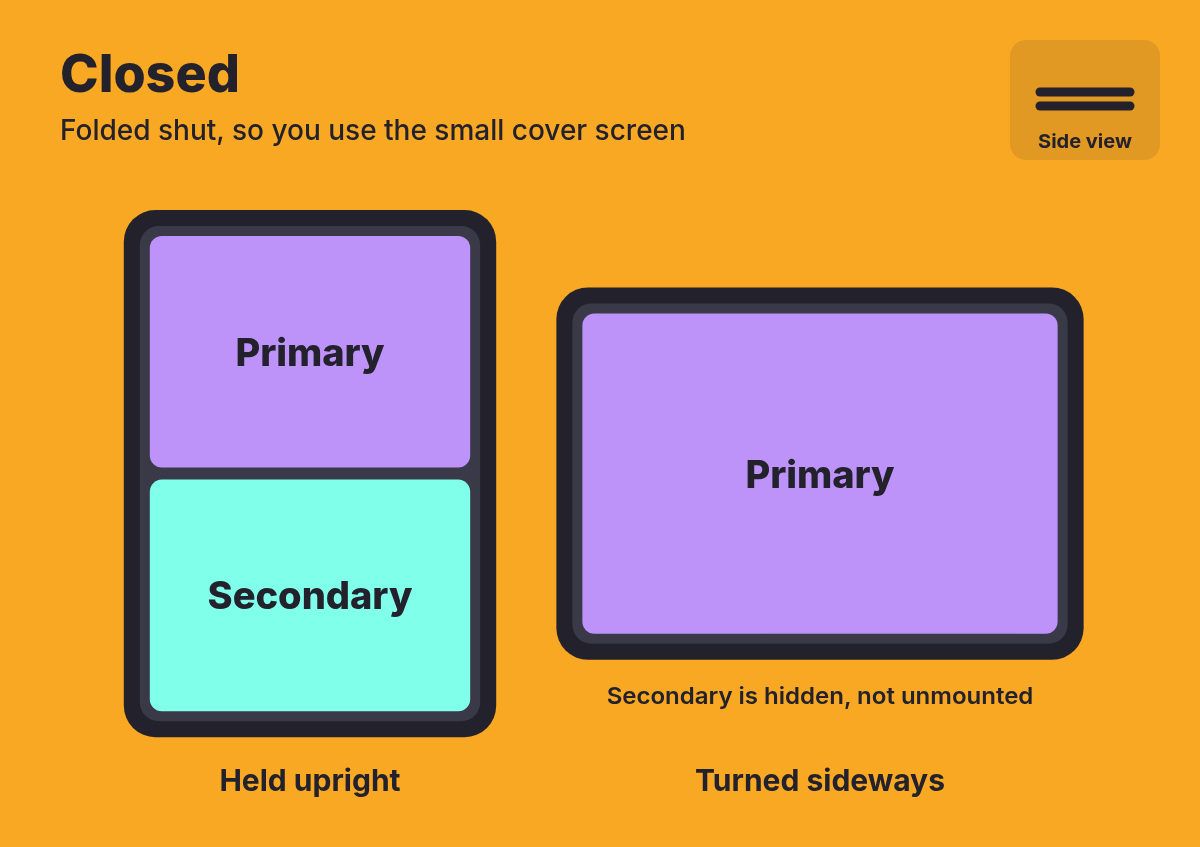
It's Half-open like a book, and you're holding the Duo as if it were a paperback, so the fold goes from top to bottom.
ArrangementView places the main pane in the left half and the secondary pane in the right half, and includes a small gap on either side of the divider so that nothing ends up in the fold.
You have turned the Duo sideways, Half-open like a laptop, and placed it on a table with one half lying flat and the other elevated, making the crease run side to side.
The panes once more split along the crease, the main pane ending up on the upper half and the secondary pane on the lower half, thus causing neither of them to bend around the fold.
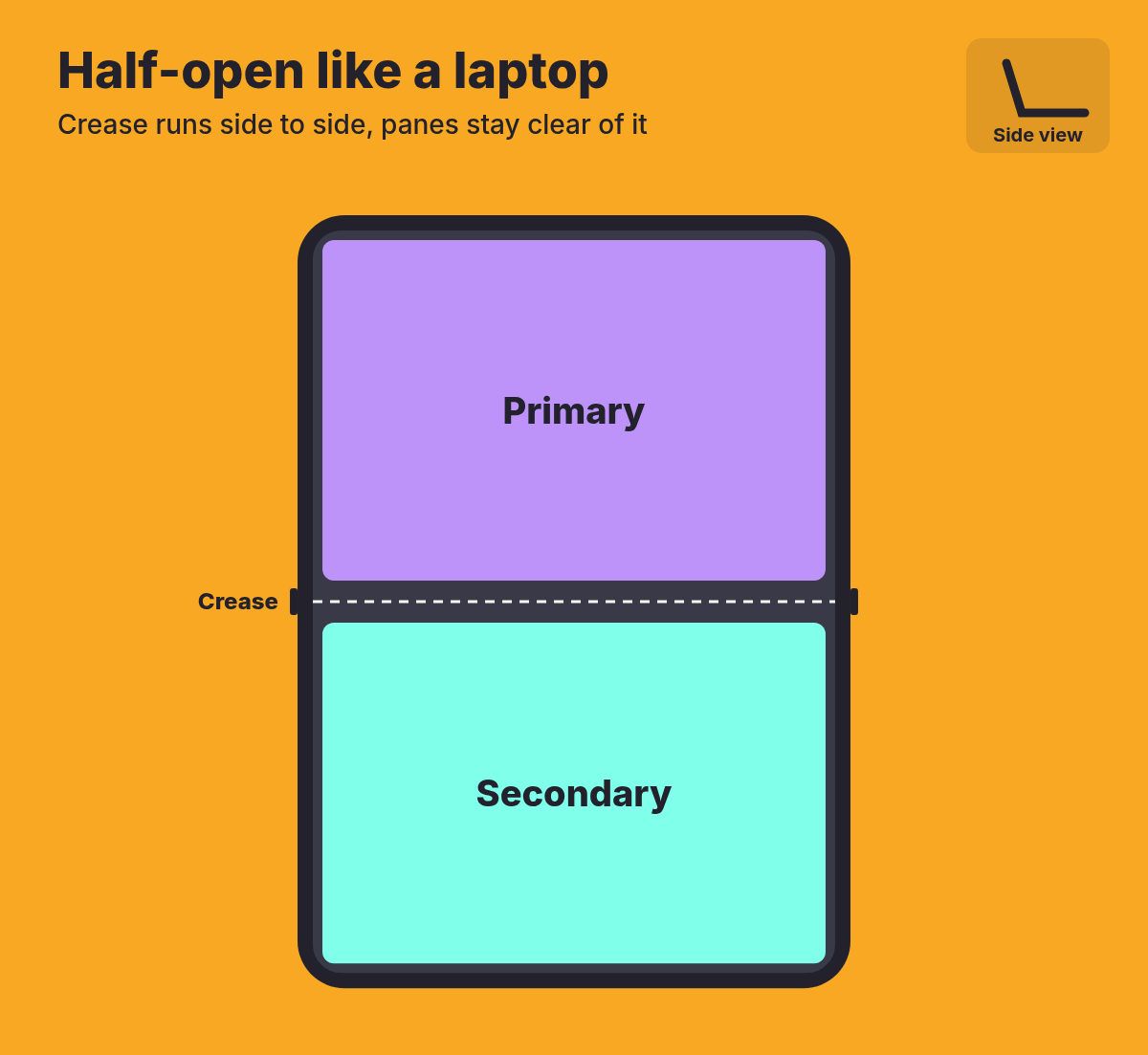
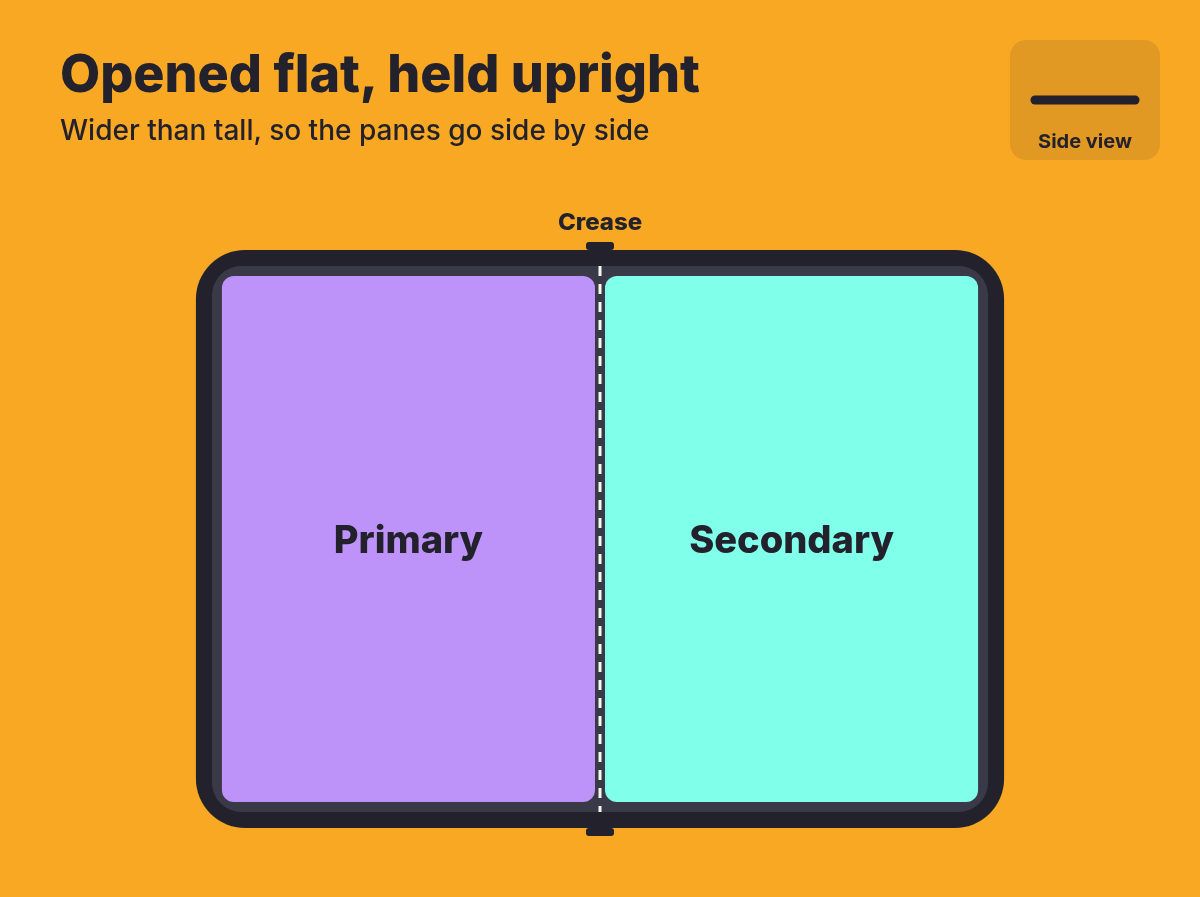
When the Duo is Opened flat and held upright, it forms a single large screen which is wider than it is tall, just like a small tablet.
The crease is now flat, after which ArrangementView ceases to worry about it and places the primary and secondary panes next to one another.
The nice part is that it doesn't invent its own rules.
On iOS it hands the job to SwiftUI's new ArrangementView (iOS 27.1 and up). Android has no equivalent, so it applies Material's adaptive layout rules on top of Jetpack WindowManager.
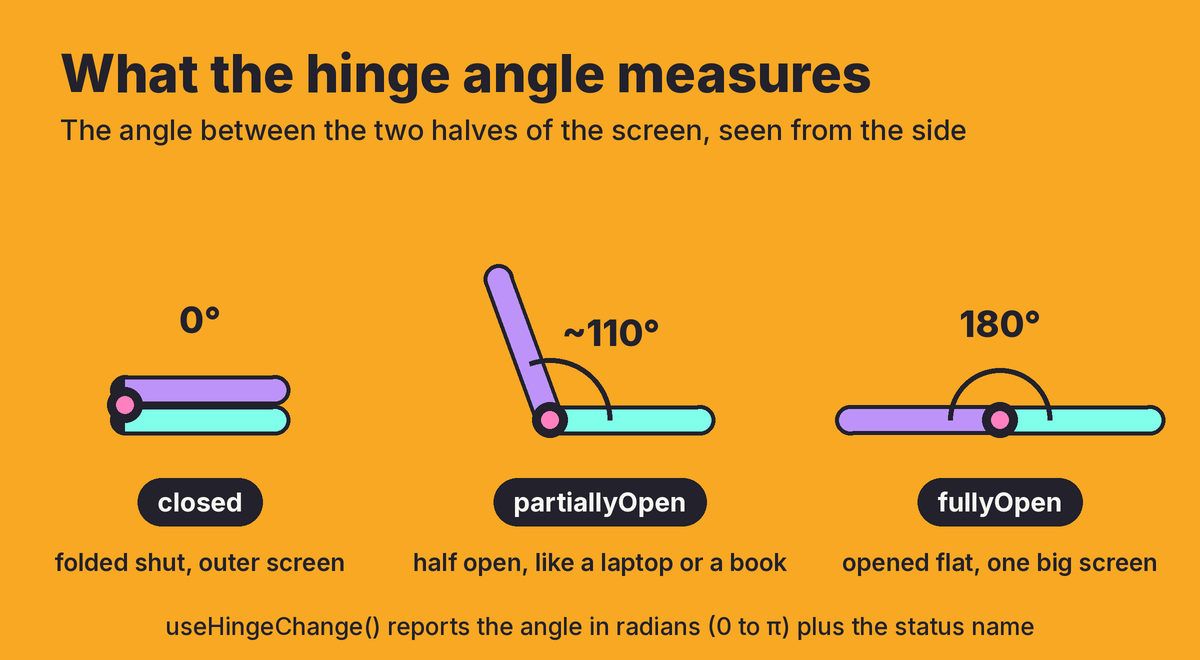
There's also a useHingeChange hook, which tells you how far open the phone is.
The hinge angle is the angle between the two halves of the screen, so it's 0° when the phone is folded shut and 180° when it's opened flat.
Along with the angle you get a status of closed, partiallyOpen or fullyOpen, and the operating system decides where one ends and the next begins.
You don't need it for layout, because ArrangementView already handles that.
It's for apps that want to behave differently when folded, like a video player that fills the screen when the phone is flat but puts the video on top and the controls underneath when you stand it up like a laptop.
function Player() { const { status } = useHingeChange(); // Stood up like a tiny laptop? // Video on top, controls underneath. return status === 'partiallyOpen' ? ( <TabletopPlayer /> ) : ( <FullscreenPlayer /> ); }
So, unlike the U2 album…
react-native-arrangement-view is something you'll actually want in your library.
👉 react-native-arrangement-view

Two Days of React in an Old London Brewery
React Advanced London is back on October 23 & 26, 2026.
The first day is in person at The Brewery, a London venue on the site of an 18th-century brewery, and it's streamed online for everyone who can't make it.
The second day is fully remote, so wherever you are, you still get two days of advanced React engineering.
You'll be joining 700+ engineers for 40+ talks and workshops, given by the library authors and core contributors who build the stuff you ship.
The big topics this year are React Server Components, the React Compiler and AI-assisted development.
And because this is The React Native Rewind, we have to point out there's also a talk on building game UIs in Unreal Engine with React Native.
If the talks don't win you over, the karaoke at the React party might.
👉 Reserve your spot at reactadvanced.com

Never Gonna Show You a Black Frame
In 2024 Oxford selected 'brain rot' as its Word of the Year.
That seems about right for a species which now measures its evenings by vertical videos.
And if you've ever tried to build one of those feeds in React Native…
You'll know the rot works both ways.
If you swipe too quickly then you end up on a black screen.
If you swipe more quickly then two videos will start to talk over each other.
Meanwhile… the phone is still quietly downloading videos that you had already scrolled past.
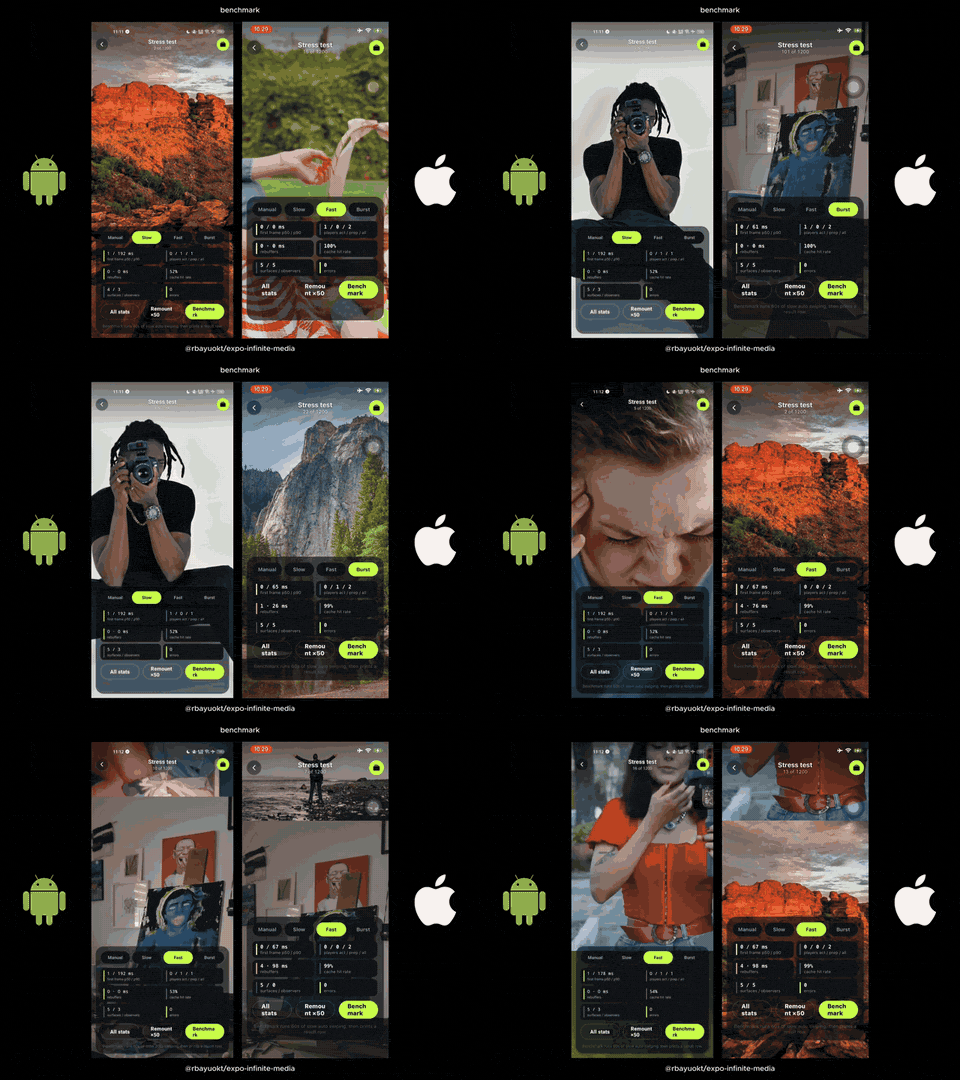
Rizky Bayu Oktavian (@rbayuokt) set up expo-infinite-media in order to deal with that.
It is a feed in the style of TikTok which is designed for Expo and React Native CLI applications, allowing you to go through the posts one by one by swiping through the videos and photos.
You may ask…
Why not just put a video player in every row of a FlatList?
A FlatList has a number of rows mounted both above and below the screen, and each of the mounted rows has its own video player.
The various video players have no knowledge of one another.
That means that when you're watching one video there will be 10 video players all downloading, buffering and decoding (that is, converting the downloaded file into frames that the screen can display) at the same time, all competing for the same amount of bandwidth and memory.
The start of playback also involves JavaScript.
The FlatList tells the system which row is currently on screen, after which a React effect is carried out, and it is only at that point that the video player begins... so if the JavaScript thread is busy, the video will start late or display a black frame.
expo-infinite-media makes those decisions part of the native code (AVFoundation on iOS, Media3 on Android).
As you scroll the same small number of video players is reused, a preload policy (which specifies which videos should be downloaded in advance) retrieves the next few videos, and the native code begins playing the video on screen without having to wait for the JavaScript thread.
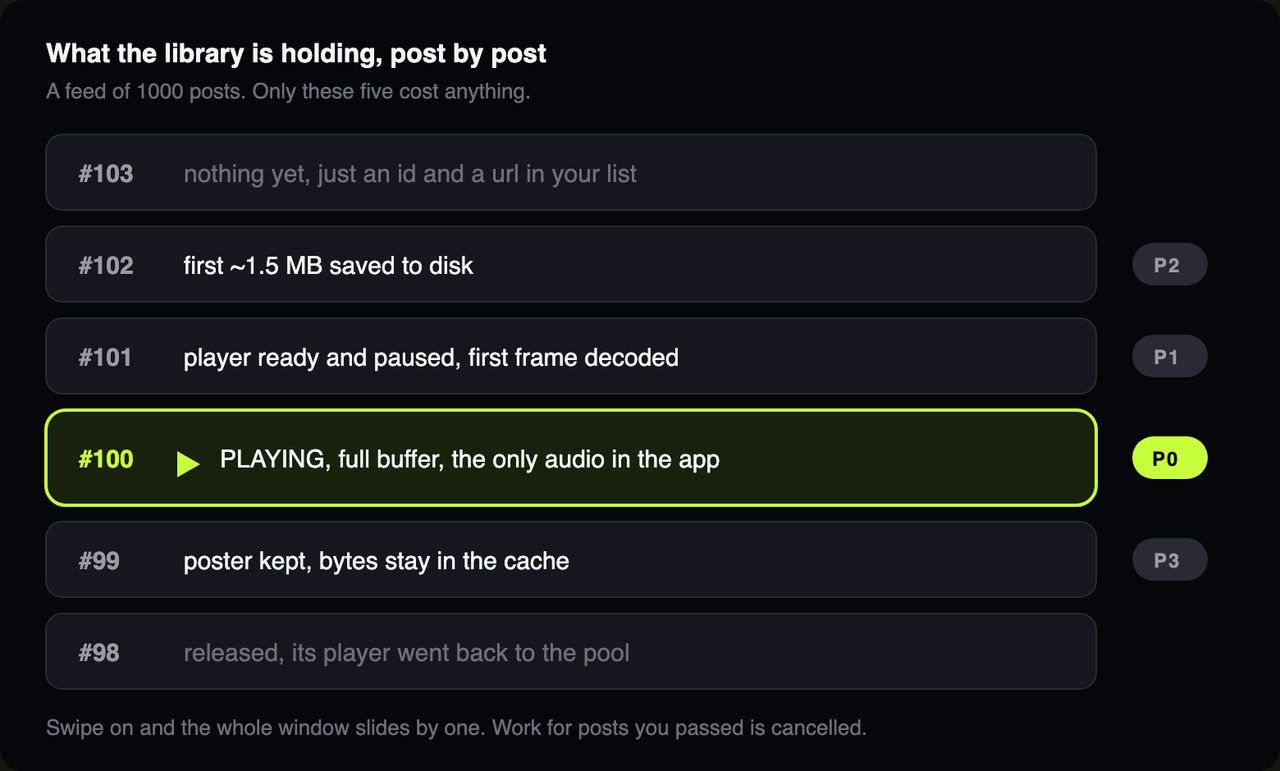
The video you're currently viewing is loaded fully into the buffer, the next one has its player ready with the first frame already decoded, and the one after that has only about its first 1.5 MB saved to disk.
If you go any further than that, it costs nothing, and the download will be cancelled if you pass a post while it is downloading.
Every post is a plain object with an id, a type and a uri, plus a poster (the still image shown while a video loads) for videos.
const items = [ { id: 'v1', type: 'video', uri: 'https://cdn.example.com/v1.mp4', poster: 'https://cdn.example.com/v1.jpg', }, { id: 'p1', type: 'image', uri: 'https://cdn.example.com/p1.jpg', }, ];
Then, using it looks a lot like a FlatList:
<InfiniteMediaFeed data={posts} onEndReached={loadMore} renderOverlay={({ item, isActive }) => ( <Caption item={item} active={isActive} /> )} />
expo-infinite-media needs a development build and the New Architecture...
And version 0.1.0 landed on September 23, so the only thing less stable than the API is your users' attention span.
Nobody waits for a black screen to load...
They swipe to the next video, and now the next video is already playing.
React Native 0.88 is intended to be a non-breaking release, so rc.2 is largely reversing certain changes, for example, the one that prevented some of the TurboModules from compiling in 0.87.
📦 React Navigation 8.0.0-alpha.38
Actions like goBack() now run from the screen that called them, not the focused one... so background screens can stop sending your users to mystery places.
Worklets runtimes can now use fetch in Bundle Mode, and Worklets is the fourth library to add Swift Package Manager since we started counting.
William Candillon (@wcandillon) drops the old architecture in Skia 2.13, so old-architecture apps have officially run out of Skia upgrades.
Re.Pack now only compiles a platform when its bundle is first requested, so launching iOS no longer means waiting for Android.
New apps now get an AGENTS.md instead of a CLAUDE.md... sorry, Claude.
Michał Pierzchała (@thymikee) shipped seven versions in four days, including an animated iPhone Duo hinge and support for grandma-sized fonts.
Software Mansion's Argent (lets coding agents tap and swipe in the iOS simulator) now supports foldables too... so robots are folding more iPhone Duos than humans.
Jay Meistrich (@jmeistrich), now renders rows ahead in whichever direction you scroll, and chat lists stay pinned to the bottom when the layout changes.
📝 RFC: Secondary JavaScript runtimes in React Native
Tomasz Żelawski (@tjzel) wants React Native to ship an official API for extra Hermes runtimes, instead of every library building its own.
📝 What if your app could fix itself?
Rami Maalouf (@rami__maalouf) built an agent that reproduces a bug on the EAS Simulator, fixes it and opens a PR…
However, you still have to press merge yourself… for now.