

469 Lines And A Video Confession
Your agent just fixed a crash.
The PR is 469 lines, the tests are green, and the description says the crash "is now fully resolved", in the past tense, from an agent that has never seen the app boot.
Did the fix work?
The agent never ran the app because running it needs a simulator, and the only simulator in the building is on your laptop.
EAS Simulator is Expo's answer.
Expo runs iOS simulators on Expo's cloud Macs, and your agent can request one.
The simulator boots for that session, the agent installs a build and drives the app on the simulator, and when the agent finishes, the simulator is gone.
One command starts a session:
eas simulator --platform ios
The agent gets a simulator to drive.
You get a live stream of the agent driving.
And the loop Expo is selling goes like this…
A crash report lands in the agent's queue, the agent writes the fix with the tools already in your repo, the build installs on a cloud simulator, the agent drives the app to the screen that used to crash, and a session recording lands on the PR.
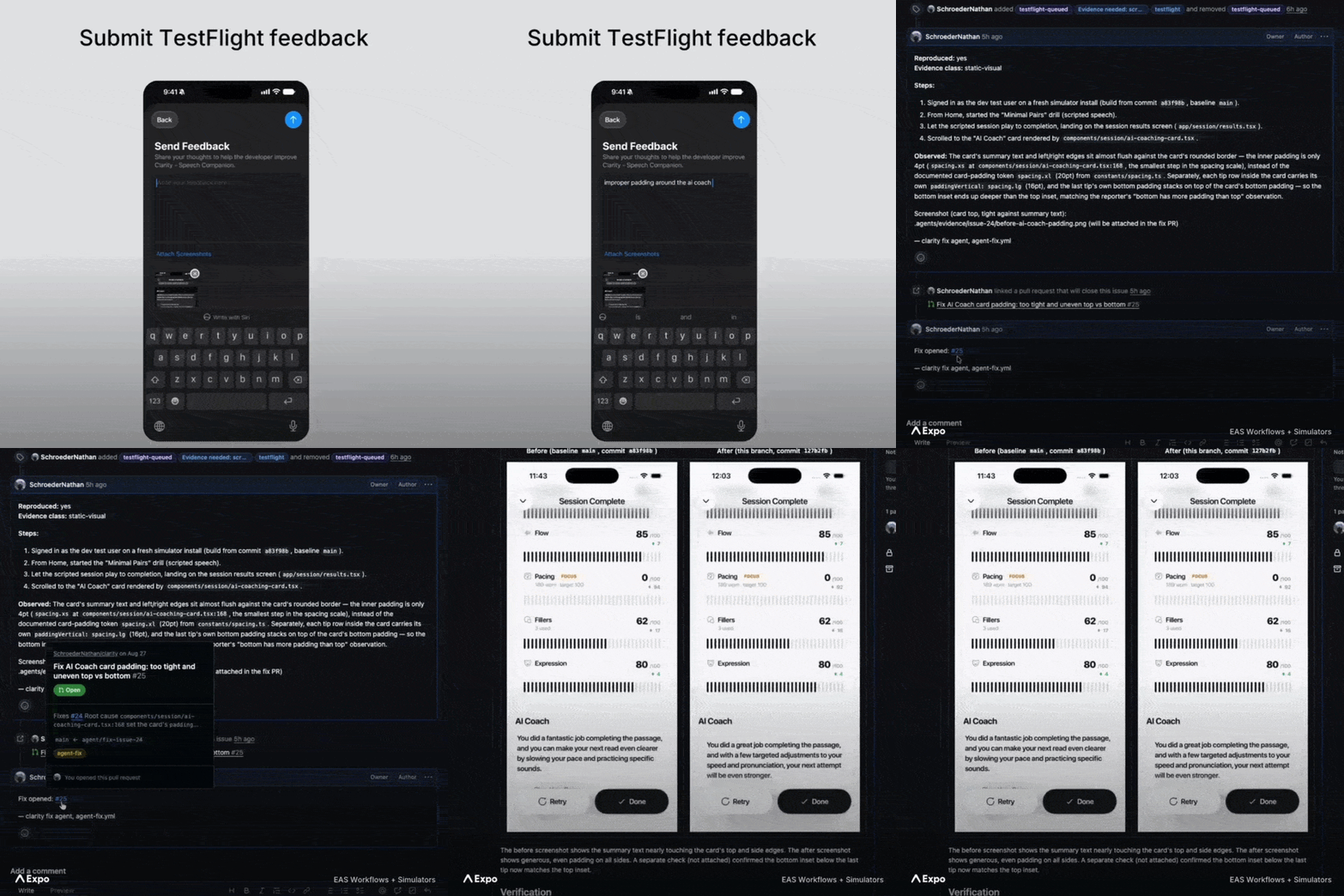
So review stops being 469 lines that look about right, and becomes a video of the fix working.
For the driving itself, you bring the tools you would point at a local simulator.
agent-device is Callstack's CLI that lets an agent tap, type, and screenshot a device.
Normally, agent-device targets the simulator on your machine, but in a session it targets the rented one instead. Every session runs isolated on the same infrastructure as EAS Build, so ten agents can each hold a simulator at once, and none of the ten simulators is your laptop.
EAS Simulator is early access behind a waitlist.
The landing page shows iOS only, and pricing does not appear on the page, which is standard for anything that involves the words "Apple hardware" and "by the hour" in the same sentence.
Did the fix work?
The internet settled the standard of proof years ago… pics or it didn't happen.
Your agent finally complies.

The biggest screen in the house runs your stack
Registration is open for the Amazon Developer virtual hackathon.
Build for Fire TV with React Native and take a swing at a $40,000 first-place prize.
Amazon Developers is after demo-ready Fire TV apps on Fire OS and/or Vega OS, built with React Native, web, or Android frameworks.
There are multiple primary tracks plus mini challenges, giving you more than one way to bring your idea to the hackathon.
Build for AI-enhanced viewing experiences, sports, fitness, family entertainment, multi-modal UX, computer vision, and whatever you can get a crowd to call innovative.
Submissions are open until October 23, with weekly office hours along the way...
And you can enter solo or finally hold every friend who's said "we should build something together" to it.
And potentially haunt a few hundred thousand living rooms with your very own JavaScript.

What Is Our Job Now, Exactly?
Your App Store screenshots are about to be shot by Goldie.
And no, not the drum and bass legend…
A different Goldie with considerably less gold in the mouth.
This one is a CLI (Command Line Interface).
goldie by @kacperkapusciak makes App Store screenshots and preview videos for an iOS app, and the intended photographer is not you.
The intended photographer is your coding agent.
App Store screenshots are the chore that never dies…
For every release and every locale (i.e. language), you need to capture the screens, frame them in a cool design, set the headline, and export at exactly the sizes Apple demands.
Two tools split this work.
Argent, by Software Mansion, the Mansion of Mansions, the Party Mansion, replays a recorded tap-through of your app on a local simulator and captures the screens.
goldie takes the captures and does the marketing half…
It wraps each capture in a device frame, drops the framed capture on a background, sets the headline, joins the clips into a preview video with ffmpeg, and checks the output against Apple's upload rules.
The checking is the underrated part.
Apple wants 6.9 inches, so does your girlfriend, but Apple also wants exactly 1320 x 2868 and a video between 15 and 30 seconds, and goldie checks the lot before you ever open App Store Connect.
goldie all is the entire pipeline in one command…
npm i -g goldie goldie all # capture, frame, render, verify goldie studio # tweak the design in the browser
Or hand the job to your agent because goldie ships as a skill:
npx skills add kacperkapusciak/goldie
The agent explores the app, writes the flows and the config, and opens the studio.
The studio is a browser editor for backgrounds, bezels, templates, and fonts.
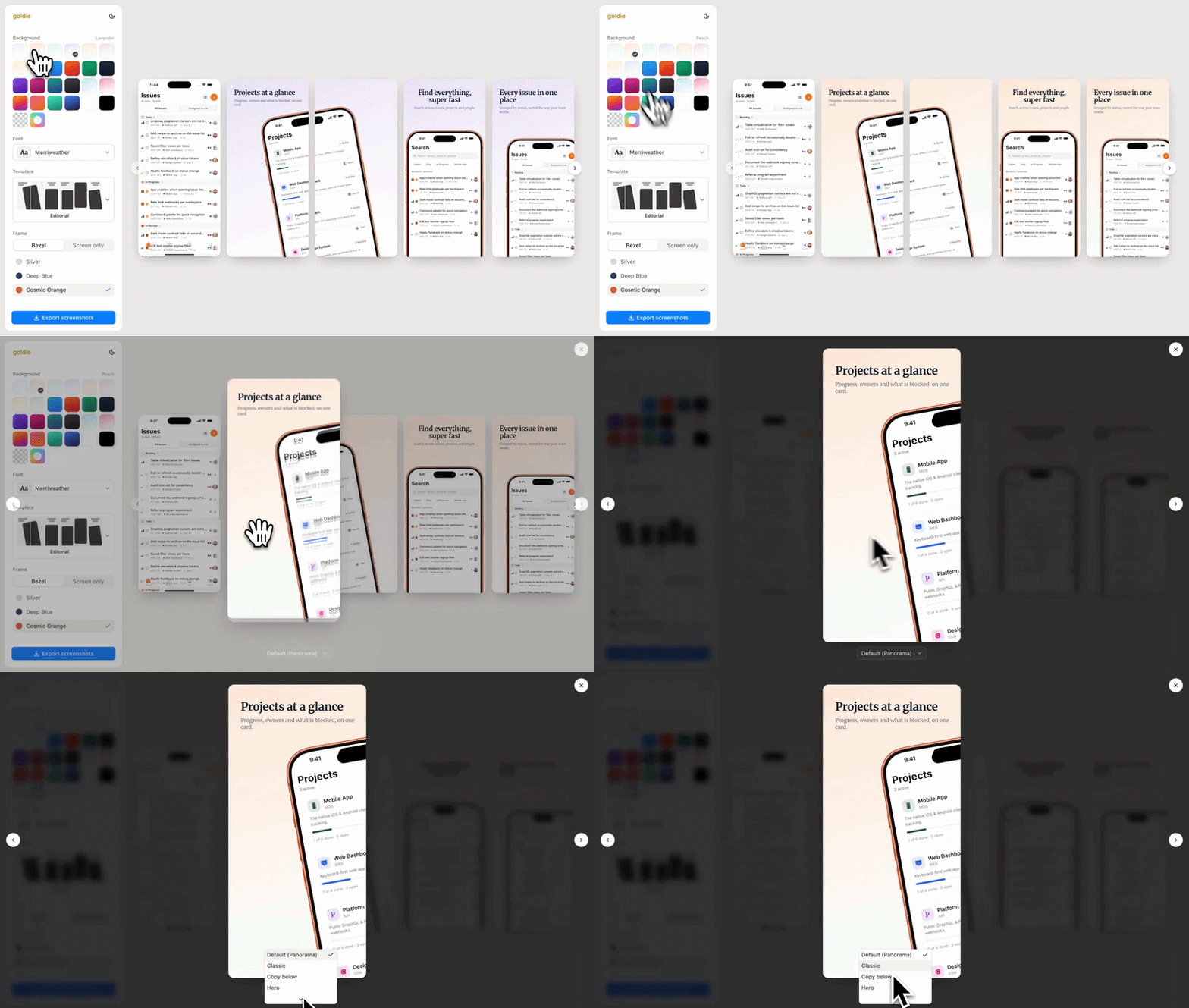
Every choice lands in the same files, so the CLI renders the same design on the next release.
goldie needs macOS with iOS simulators, Node 20, and ffmpeg.
And because goldie is one command, nothing stops you from putting goldie all at the end of the release pipeline, so every release ships with screenshots of the app you actually released, in every locale, without anyone opening a design tool.
The honest catch is the flows…
Recorded flows break when the app changes, and the documented fix is to ask the agent to repair them, so the pipeline stays automated right up until the moment the app adds a new button.
The other Goldie spent 30 years perfecting his craft.
This goldie drops a full album every release.
👉 goldie

Two Agents, One Simulator
Nobody who has watched two agents try to share one simulator has wanted to watch it again.
Agent one boots the simulator and starts installing a build… agent two erases the simulator mid-install… and neither agent ever finds out the other exists.
Simlock, new from the Callstack incubator, is a control plane for iOS simulators and Android emulators.
Cough… cough… control plane meaning the front desk every agent has to go through, instead of grabbing devices straight out of simctl (Apple's command-line tool for creating, booting, and erasing simulators).
Simlock's one idea is the lease.
An agent never grabs a simulator directly.
The agent asks Simlock for a device, and the asking is one command, run by the agent itself:
simlock lease --platform ios \ --device "iPhone 16" --detach
One JSON line comes back, and the answer is JSON so the agent can parse it:
{ "lease": "lse_9f2c", "platform": "ios", "device": "iPhone 16", "os": "18.4", "state": "leased" }
The device arrives booted and health-checked, and no other agent gets the same device until the agent returns it or the lease runs out.
Ask for an iPhone 16 that is already leased and Simlock provisions a fresh one, up to a capacity limit worked out from your machine's CPU and RAM, and past the capacity limit new requests wait in a queue instead of failing.
Idle devices get shut down to free RAM, then deleted to free disk space.
And for the day everything has gone sideways, simlock nuke shuts down and deletes every device Simlock ever created.
So how does an agent know to use Simlock?
You tell the agent.
Simlock cannot force any of this.
An agent that calls simctl directly still gets a simulator, and Simlock Can't Stop the call.
The whole scheme rests on one instruction in your agent rules.
An AGENTS.md entry would read something like this:
<!-- AGENTS.md --> Never call simctl or avdmanager directly. To get a simulator, run simlock lease and use only the device it returns.
By default, the lease command keeps running in the background while the agent works, and Simlock treats the running process as proof the agent is still alive.
When the process dies, the lease is released automatically, and the --detach flag in the example above swaps the running-process check for a time limit instead.
You can also set up an MCP server for Simlock (MCP being the Model Context Protocol, the standard that lets an agent call outside tools).
{ "mcpServers": { "simlock": { "command": "simlock", "args": ["mcp"], "env": { "SIMLOCK_AGENT_ID": "agent-1" } } } }
simlock mcp exposes exactly four tools: list, lease, release, and status.
Each agent can hold one device at a time, with the SIMLOCK_AGENT_ID in the config acting as the agent's name, so a single agent cannot quietly collect five simulators.
One catch before you try Simlock…
There is no npm package yet, so installing means cloning the repo and building it yourself with pnpm.
Expo's answer, one section ago, was renting every agent a simulator of its own.
Simlock's answer is teaching them to share yours.
One of those answers is free, and it isn't the one with a waitlist.
👉 Simlock