

Your Agent Can Publicly Apologize
You asked for a bottom sheet.
Your agent reached for @gorhom/bottom-sheet… dragged Reanimated in behind it… And wrote a gesture handler with the confidence of someone who has never held an Android phone.
Expo's own instructions say to use BottomSheet from @expo/ui, and explicitly tell the agent not to reach for Reanimated or Gorhom.
Your agent had never read those instructions.
Now it can.
Expo has pulled its AI agent setup into one install, one page, and three moving parts.
For Claude Code, it is a single command:
claude plugin install expo@claude-plugins-official
So what is inside?
First, Expo Skills.
Instruction files that teach an agent known-good Expo patterns, 24 of them at the time of writing, covering routing, native UI, brownfield integration, SDK upgrades, and the EAS side from workflow YAML to store submission.
Second, the Expo MCP Server (MCP being the protocol agents use to call outside tools).
You authenticate with your Expo account, and it hands the agent live documentation instead of the documentation, plus your EAS build history, workflow logs, TestFlight crashes and feedback, and Play Console crash data.
Third, the boring one that matters most.
create-expo-app now drops AGENTS.md, CLAUDE.md, and .claude/settings.json into the project root, and you commit them like any other config.
What they actually do is point the agent at the documentation for the SDK version sitting in your package.json, rather than whichever SDK it claims to “remember”.
Then there is the local half, where it becomes more than a docs lookup.
npx expo install expo-mcp --dev EXPO_UNSTABLE_MCP_SERVER=1 npx expo start
With expo-mcp installed and Metro started behind that flag, your dev server signs in to the same Expo account and announces itself as a machine with an attached simulator.
Ask the agent to add a button and check that it renders.
The round trip goes like this… the agent asks Expo MCP for a screenshot, Expo MCP forwards the request to your dev server, which grabs the frame from the simulator, and the image goes back to Expo's MCP server, which hands it to the agent as the answer to the request it made.
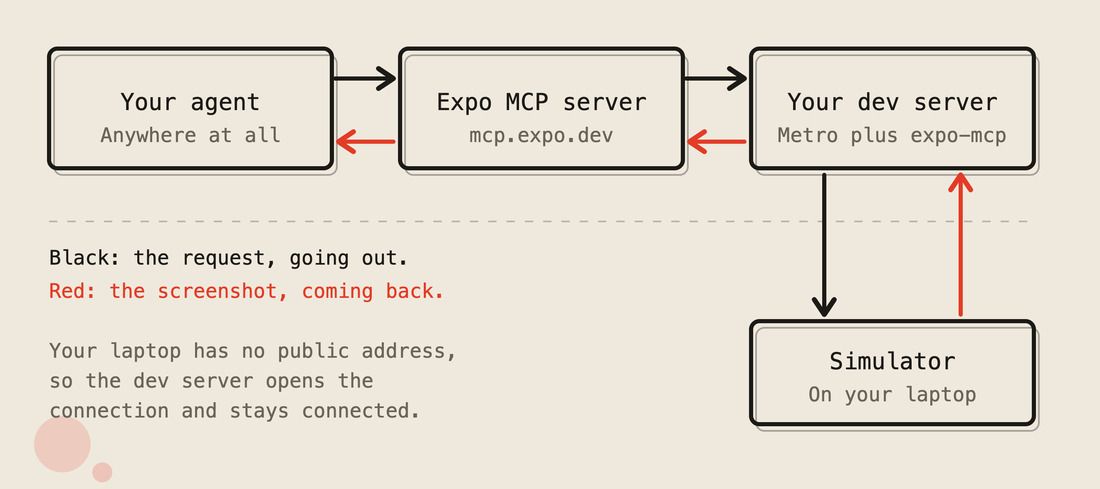
Expo cannot open a connection to your laptop because your laptop has no public address.
So the dev server connects to Expo instead and stays connected.
The upside is that the agent never has to be on the same machine as the simulator.
The tool list is where it gets properly strange.
appstore_reply_review posts a public developer response to an App Store review, and playstore_reply_review does the same on Google Play, capped at 350 characters.
Your agent can now publicly answer a one-star review under your name.
Sleep well…
Nothing in here makes your agent accountable for a single thing it ships.
It can, however, apologise for it publicly on the App Store.

A Shitaton Of Money is Awaiting You
You have 30 days.
Shipaton 2026 runs until 30 September, and the requirements are almost insultingly achievable…
Build a brand new mobile app, wire up RevenueCat for at least one purchase or RevenueCat Ads, and get it live on the App Store, Google Play, or the Samsung Galaxy Store.
The prize pool is over $1 million, more than $700,000 of it in cash, spread across categories for games, design, build in public, students, and monetisation, with ShipKit perks thrown in to get you out the door.
Your app folder has been judging you long enough.
One of those projects is closer to shippable than you think.

24 Models Walk Into A Function
Every AI SDK demo streams beautifully.
On a MacBook…
In a conference talk…
To a room of people who will never wire the demo into a phone.
Wire the demo into a phone, and you get this instead:
tokens arriving what the user sees "The qu" → spinner "The quick brown" → spinner [stream ends] → The quick brown fox
The model streamed.
Your app did not.
React Native's fetch does not hand over a response body until the whole body has arrived, so every token waits in a buffer until the last token lands.
TanStack AI fixes the buffering in one import.
A server-side function that talks to any of 24 model providers through one interface.
// server: an Expo API route, or any Node handler import { chat, toHttpResponse } from '@tanstack/ai' import { openaiText } from '@tanstack/ai-openai' export async function POST(request: Request) { const { messages } = await request.json() const stream = chat({ adapter: openaiText('gpt-4o'), // swap out providers here messages, }) return toHttpResponse(stream) }
Send the messages to the model, the model asks for a tool, chat() runs the tool, chat() sends the tool result back to the model, repeat until the model is finished. The same chat() function handles structured output, image and audio generation, and MCP tool servers.
Then you use useChat, which is a client hook that holds the conversation, sends new messages to your server, and updates the screen as tokens arrive. useChat exists for React, Vue, Solid, Svelte, and React Native.
// ChatScreen.tsx import { useChat, xhrHttpStream } from '@tanstack/ai-react' const { messages, sendMessage } = useChat({ connection: xhrHttpStream(`${baseUrl}/chat/http`), })
The phone posts the conversation to your backend, your backend hands it to OpenAI, and every token OpenAI sends back gets forwarded to the phone as it arrives, one line at a time, where useChat appends the token to the message on screen.
If the model asks for a tool, your backend runs it and continues.
The phone never knows a tool ran.
Every line above is the same code a React web app would use.
One difference… the xhr in xhrHttpStream.
On the web, you would pass fetchHttpStream there, because the browser's fetch lets you read a response while it’s still arriving.
React Native's fetch does not…
React Native's fetch waits for the whole response and hands you the lot at the end, which is the spinner at the top of the section.
So on React Native you pass xhrHttpStream instead, and xhrHttpStream uses XMLHttpRequest, the request API browsers had before fetch, which React Native still ships.
XMLHttpRequest fires a progress event every time more of the response lands, and xhrHttpStream reads whatever has arrived on each one.
That is how the tokens reach the screen one at a time.
So, 24 models walk into a function…
The function serves each one a token at a time.
For the first time, your phone is allowed to watch.

Putting Your JSX In A GNOME
What does React look like with no browser…
And no phone anywhere in the picture?
It looks like GNOME.
Okay… time for school…
Linux doesn't come with a desktop the way a Mac does…
The window borders, the taskbar, the settings app, and the file browser are separate things you install on top of Linux.
GNOME is the most common desktop… GNOME draws the window borders and the taskbar, GNOME is the settings app and the file browser, and when you boot a Linux machine and see a desktop, most of the time you are looking at GNOME.
GNOME's own apps are built from GTK4, which is GNOME's UIKit. The C library that provides the actual button, list, and window.
GTKX by Eugenio Depalo (@eugeniodepalo) lets you write GNOME apps in React, using GTK4 widgets, so the button your JSX produces is the same button GNOME's calculator uses.
import * as Gtk from "@gtkx/gi/gtk"; import { GtkBox, GtkButton, GtkLabel } from "@gtkx/jsx/gtk"; import { useState } from "react"; const Counter = () => { const [count, setCount] = useState(0); return ( <GtkBox orientation={Gtk.Orientation.VERTICAL}> <GtkLabel cssClasses={["title-2"]}> {`Count: ${count}`} </GtkLabel> <GtkButton label="Increment" onClicked={() => setCount((c) => c + 1)} /> </GtkBox> ); };
Your React code runs in Node, not in a browser.
A React reconciler (the layer that turns your component tree into real UI objects) turns every JSX element into a real GTK4 widget, so a button is <GtkButton>, and useState drives <GtkButton> exactly as useState would drive a <Pressable>:
GTK4 is a C library, and Node cannot call C on its own, so GTKX puts a small Rust layer between the reconciler and GTK4.
The reconciler asks the Rust layer for a widget, and the Rust layer calls the GTK4 library already installed on your machine, because every GNOME desktop already has GTK4 installed.
Then there is the React Native half, and it exists for one reason.
GTKX gives you GTK's components… <GtkBox>, <GtkButton>.
That means you can write a Linux-only app in React.
react-native-gtkx by Anton Petrov (@itsmepetrov) is a separate project on top of GTKX that gives you React Native's components instead… <View>, <Text>, <Pressable>… so the app you already ship to iOS and Android runs on a Linux desktop without a rewrite.
GTKX 1.6.0 landed on 29 August and calls itself production-ready.
react-native-gtkx is at 0.4.0 and makes no such claim.
Either way, whatever you build looks like GNOME.
Whatever you build was always going to look like GNOME…
Every widget in the app is a GTK4 widget GNOME already had.
The only thing GNOME did not have before is your JSX.
So…
Finally… you can put your JSX inside a GNOME.
👉 GTKX