(Always Sunny - Did somebody get addicted to crack?)
Grab Your Crayons, Honey!
Let's face it.
We all love to draw.
If you don't, then you need to read some Carl Jung and dive deep into your unconscious through shadow work and dream exploration to find and re-integrate your inner child.
For those of us who have done the hard work of reintegrating our inner children,
@adithyavis has blessed us with React Native Canvas Kit.
But hold on…!
Before you grab your crayons, let's cover what it is.
React Native Canvas Kit is built on React Native Skia (the bindings that put Google's Skia engine inside your app).
Skia is the 2D graphics engine behind Chrome, Android and Flutter, taking paths, gradients and text and turning them into pixels on the GPU.
The React Native side of it is spearheaded by the Wizard himself, our prophet of the GPU, William Candillon (@wcandillon), who we interviewed not long ago.
Anyways… React Native Canvas Kit adds prebuilt shapes, gestures, interactivity and brushes on top, giving you a full but flexible canvas experience out of the box.
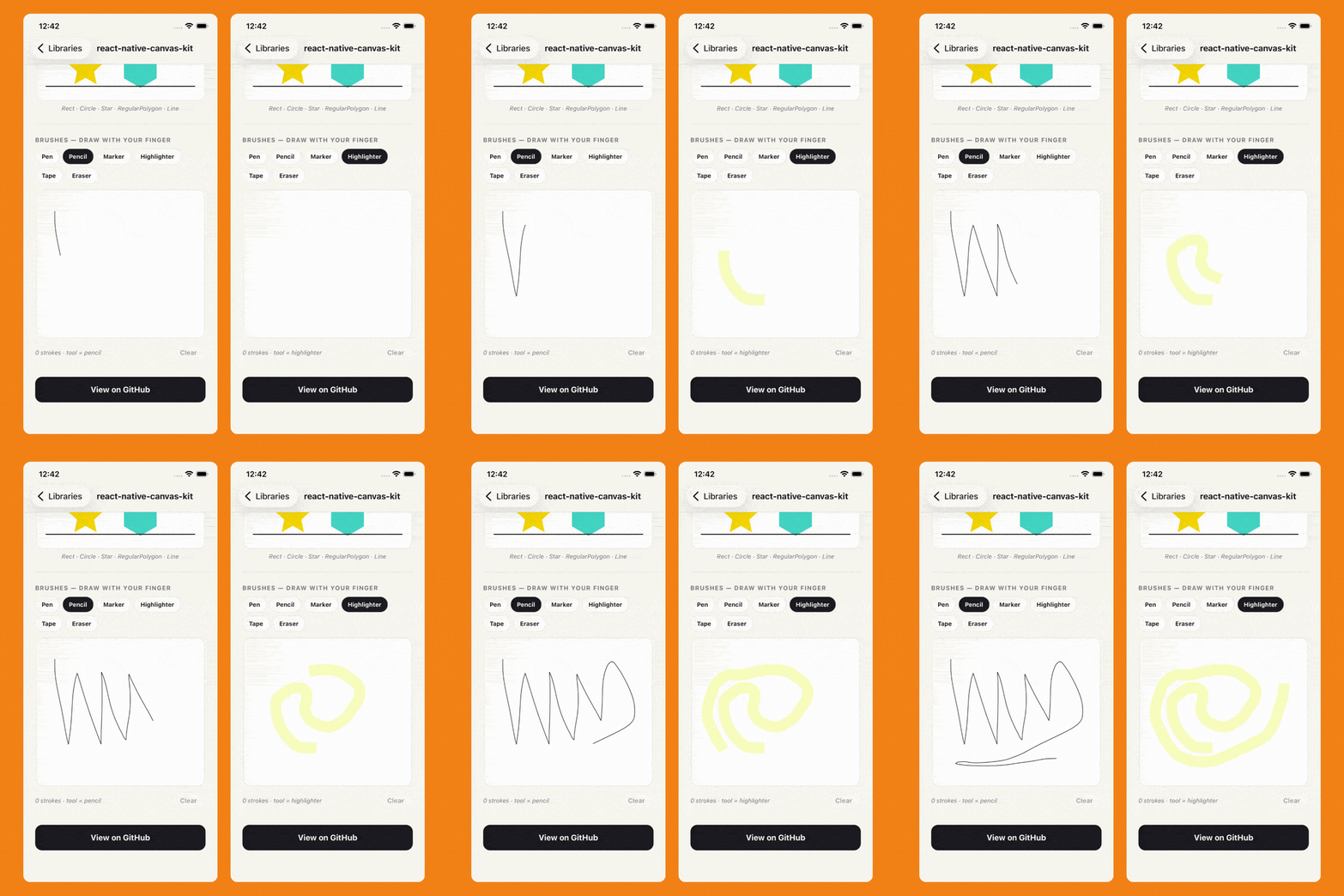
It uses layers to organise what goes on the canvas.
A Stage holds Layers, Layers hold your shapes, same idea as Photoshop.
Background on one, foreground on another.
That structure is what makes locking a layer or deleting a whole layer trivial, instead of tracking down every shape by hand.
A comprehensive art experience, like a third-year project of an Oxford student.
<Stage width={width} height={height}>
  <Layer>
    <Rect
      x={20}
      y={20}
      width={100}
      height={100}
      fill="#8a2be2"
    />
  </Layer>
  <BrushLayer tool="eraser">
    {/* only strokes inside this layer can be erased */}
  </BrushLayer>
</Stage>
A BrushLayer renders its strokes inside an isolated layer, so the eraser paints with a destination-out blend that removes pixels from the drawing and never punches through to the background behind it.
Shapes are interactive too, with resizing, dragging, bounds, and snapping to an axis or to a grid.
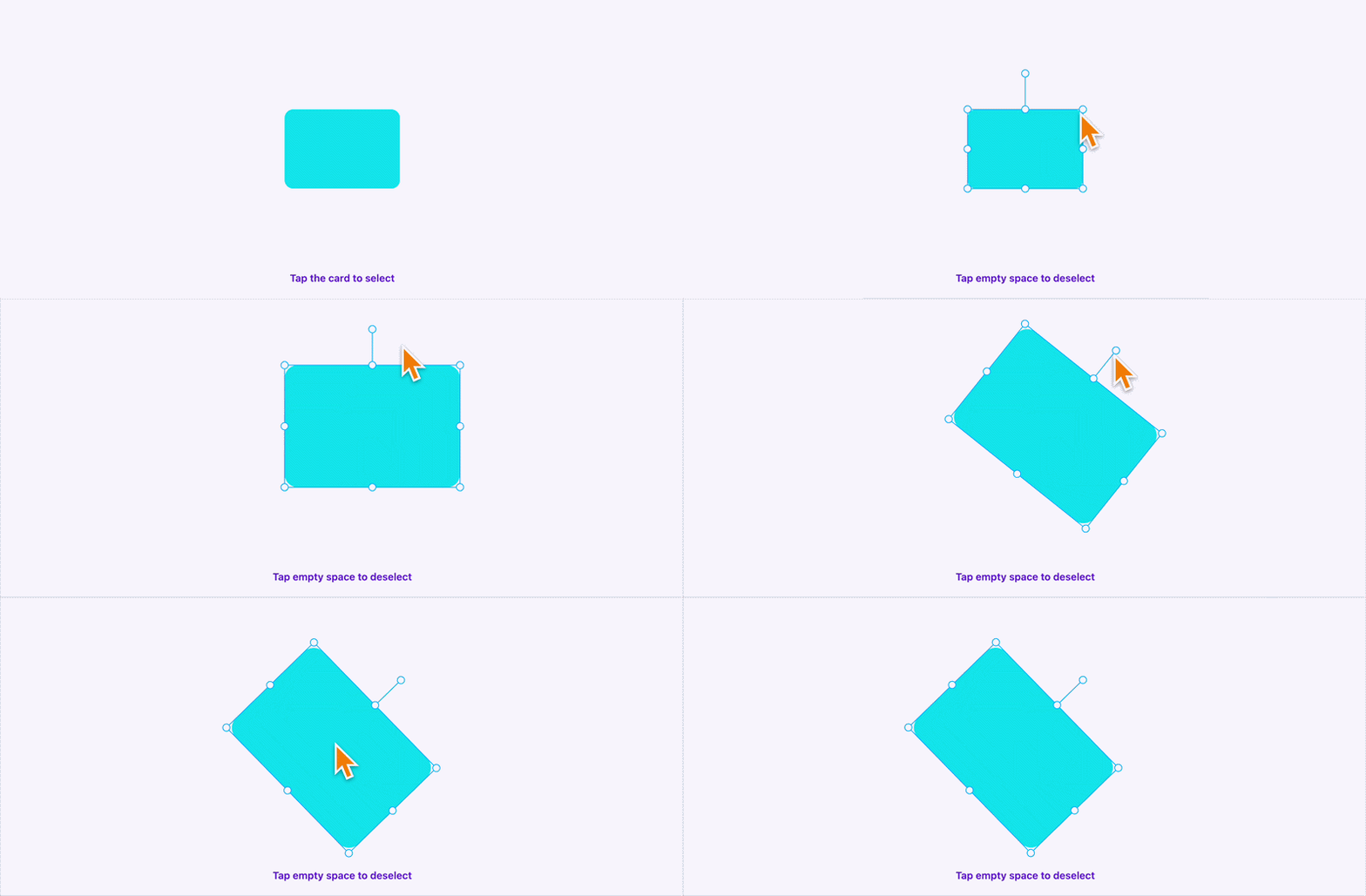
It also has web support.
Which is our favourite thing when it comes to new libraries.
Instead of just iOS and Android, we are moving to a world where React Native powers iOS, Android and… Web.
Your inner child wanted crayons.
It is getting a scene graph, a brush, an eraser and some transformable shapes.
Close enough.
Shipaton 2026: Your App Has a Deadline
Shipaton 2026 is live, which means your half-finished app can finally become either a real product or a very educational mistake.
Build a brand-new mobile app between August 1 and September 30, integrate RevenueCat for at least one purchase or RevenueCat Ads, and release it to the App Store, Google Play, or Samsung Galaxy Store. There’s over $1 million worth of prizes in total, including $700k+ in cash, across categories for games, design, build-in-public, students, monetisation, and more, plus ShipKit perks to help you launch.
Your app folder has been judging you long enough.
You can register here: Shipaton 2026
Cough, NPM Packages in Quarantine
Have you ever quarantined an npm package?
If you care about security, which, in all honesty, you probably don't, but if you do, good on you.
Here is a Blue Peter badge.
Then you already know packages at times ship with a little something extra inside them.
We saw it in March, when two poisoned axios releases smuggled in a dependency called plain-crypto-js and dropped a remote access trojan on macOS, Windows and Linux.
Which brings us to Targate, a CLI that puts a checkpoint in front of npm install.
Targate, not to be confused with a cheap knockoff of the convenience store Target, downloads a package and resolves it from the registry, then downloads the tarball (the .tgz archive npm actually ships you, the package's files gzipped into one blob) into quarantine.
Quarantine sounds like a sandbox, but it isn’t.
It is a temporary directory that is not node_modules, so nothing gets linked, nothing can be required, and no lifecycle script (preinstall, install, and postinstall) ever fires.
Then it reads. Like my Grandma at the pharmacy counter.
It checks the tarball's SHA-512 against every source it can reach, statically inspects the script bodies and file contents, maps the React Native native surface (podspecs, Gradle files, prebuilt binaries that run code at build time), and queries OSV (Open Source Vulnerabilities database, run by Google at osv.dev) for known-malicious records.
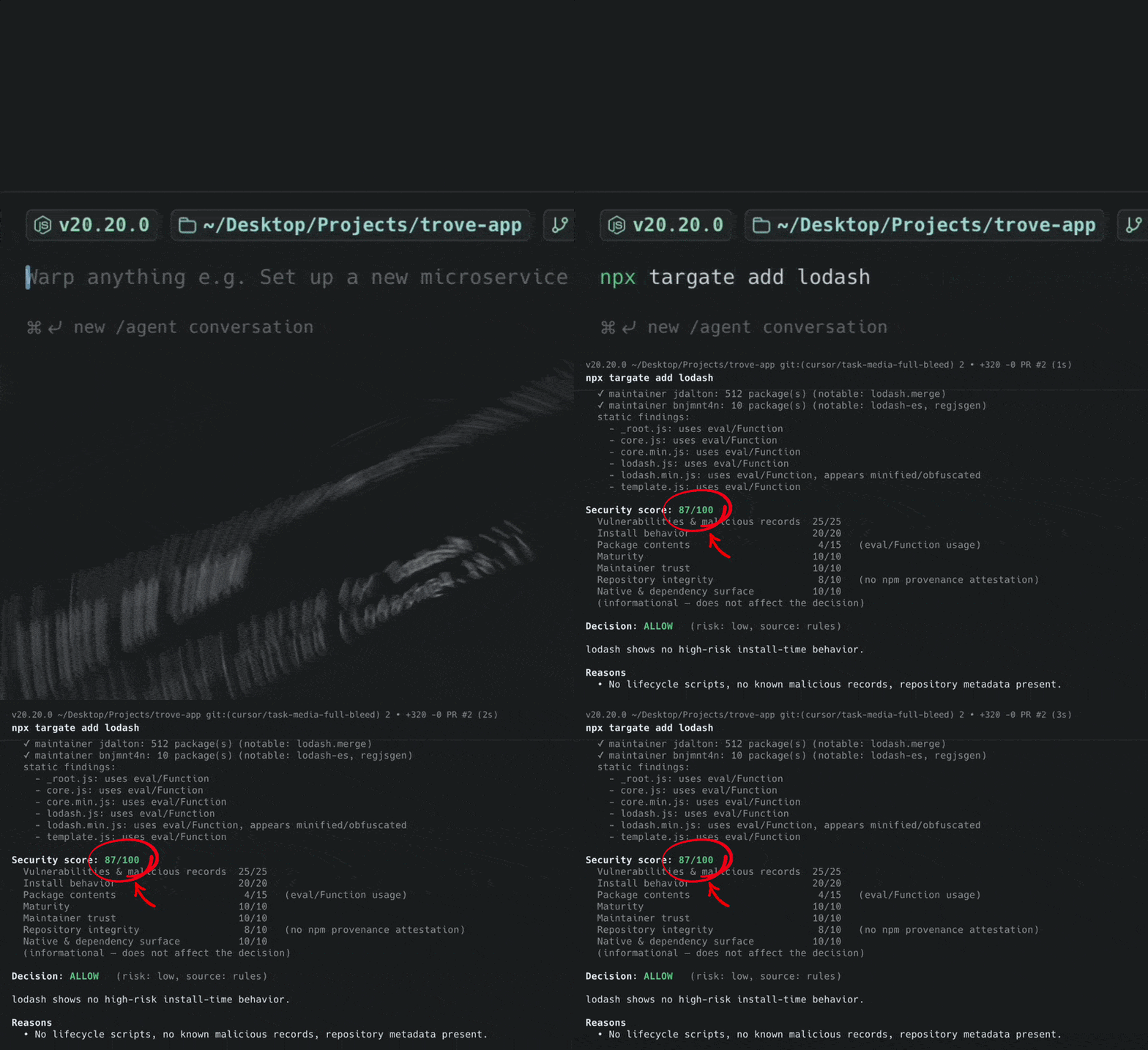
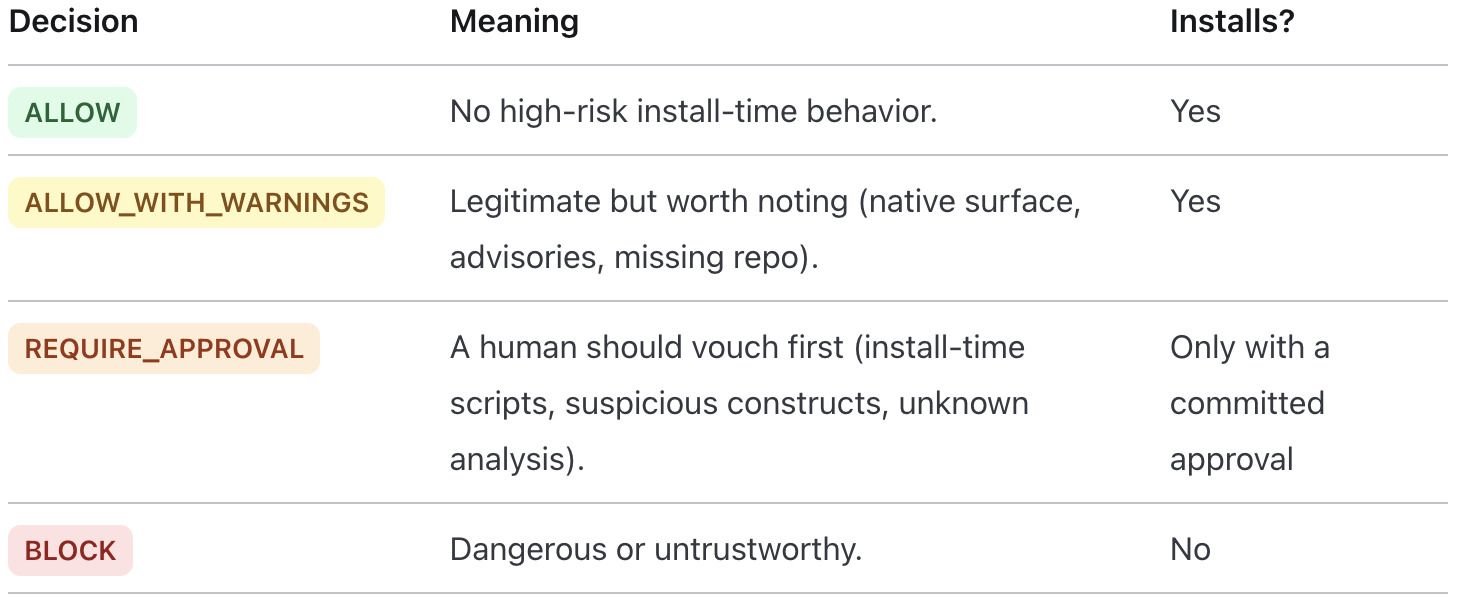
A deterministic rules engine uses crypto scam-busting magic, and returns ALLOW, REQUIRE_APPROVAL, or BLOCK, like your date's group chat working through your Instagram.
Only then does the real install run.
You can use it today. Instead of your normal npm install, you run:
npx targate add <package>
But…
There is always a Butt.
There's a limit to how much you can learn about a package without running it.
Back in 2018, the event-stream package was handed off to a stranger who added a dependency that did nothing at all until it found itself inside the build for Copay (an open source bitcoin wallet from BitPay, written in JavaScript, which had event-stream buried somewhere in its dependency tree), at which point it went looking for private keys.
The payload shipped as an encrypted blob that only decrypted once it was running.
Targate would have said ALLOW.
There is an optional AI reviewer that runs after the rules engine, and it might have caught a package that decrypts something it won't explain and then runs whatever comes out.
But nothing reads a package as well as you do.
Although, let’s be real…
Were you gonna read the package code anyway?
👉 Targate
The Rebase Wave Reaches Dave
You stack a lot of things.
You stack dishes until the sink becomes load-bearing.
You stack browser tabs until the favicons disappear.
You stack half-drunk cups of coffee and waters on your desk like a small municipal recycling failure.
And you stack pull requests, whether you meant to or not.
Here is how that one usually goes.
You open a PR for a feature, and it sits there waiting for review…
Because half the team is at Web Summit collecting tote bags in Lisbon.
Tom needs your feature before he can fix his bug, so Tom branches off you.
Alice needs Tom's fix before she can land her refactor, so Alice branches off Tom.
Mark branches off Alice because the refactor renamed the thing he was about to use.
Dave branches off Mark, having asked nobody.
Somewhere below all of this, someone's agent has opened a PR.
Then review lands on your PR, the one at the bottom, and you amend a single commit.
Tom rebases, which breaks Alice, who rebases onto the new Tom, which breaks Mark, and by the time the wave reaches Dave, the same conflict has been resolved four different ways by four different people who all picked differently.
GitHub's stacked pull requests make that tower something GitHub actually knows about.
A stack is two or more PRs in the same repo where the bottom one targets main and every PR above it targets the branch of the PR below it.
   ┌── feat/frontend     → PR #3 (base: feat/api-endpoints)  ← top
  ┌── feat/api-endpoints → PR #2 (base: feat/auth-layer)
 ┌── feat/auth-layer     → PR #1 (base: main)               ← bottom
main (default base branch)
Each PR only shows its own layer, the diff between its branch and the branch beneath it.
A reviewer opening layer three sees layer three, not the two hundred lines of schema holding it up.
Merge the PR at the bottom, and every branch above it gets rebased for you.
It’s not magic, it’s science.
Rebasing is the bit GitHub took over.
gh extension install github/gh-stack
gh stack add -Am "Add login endpoint"
gh stack submit
gh stack add cuts a branch at your current HEAD and puts it on top of the stack.
gh stack submit pushes everything, opens a PR for each branch, and links them into a stack on GitHub.
There is also gh stack up and gh stack down for moving between floors, in case you forget which one you live on.
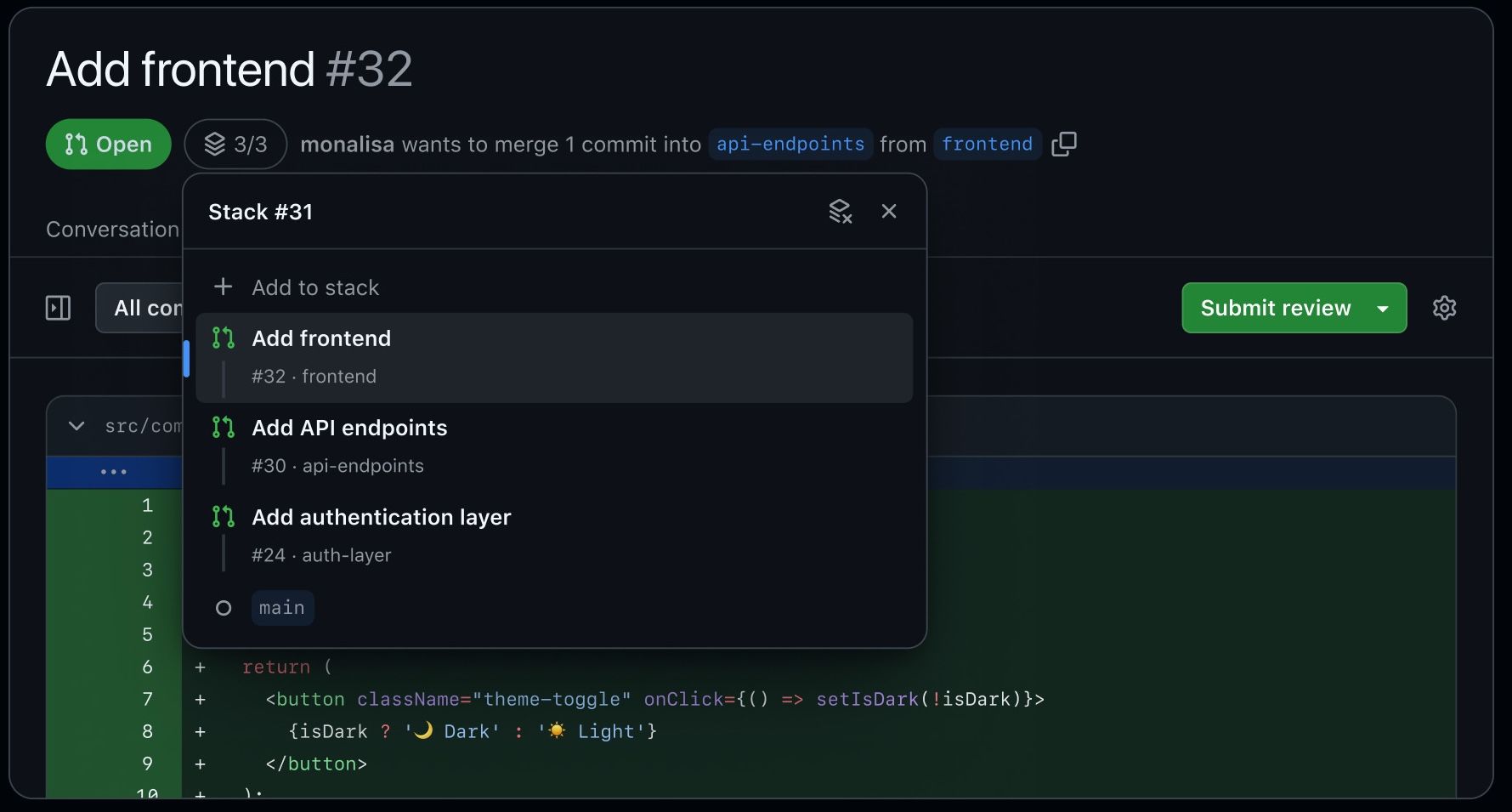
The rules do not get softer the higher you climb. Branch protection, CODEOWNER approvals and any CI that runs on main PRs are enforced on every layer, including the mid-stack ones that never touch main directly.
Merging only goes bottom-up. Merge the top PR and the whole stack lands with it. Merge something in the middle and everything below comes along, while everything above stays open and quietly re-targets itself.
The docs are also refreshingly honest about who this is really for.
🤖
When you are generating a lot of code at once, often with agents, each task gets its own layer.
One task, one PR, stacked in the order they were written.
Tom can build on top of you all he likes, and GitHub will keep the tower upright while he does it.
Dave’s agent remains at large.