You’re readi… beep… boop…
Transmission incoming from Mothership 🛸
Beep… boop… Received.
*Hello… Earthling dev dude from another microverse 👽
We want to know how The React Native Rewind has been landing, and we read every single response. It only gets better if we hear from you, so if you've got thoughts, meme ideas, or unhinged testimonials, this is your moment.
You’re reading The React Native Rewind #39

Maybe Just Call It React Native?
What if writing React for mobile didn't mean shipping Hermes, no JavaScript engine, no bundle interpreter, nothing on the user's device that needs to read your code at runtime?
Just a native binary.
Yeah. About that.
Perry is a TypeScript-to-native compiler (written in Rust, of course, because nothing in 2026 can be written in anything but Rust). It comes with a UI module called perry/ui that gives you a SwiftUI-style declarative API.
You write something like this:
import { App, Text, VStack } from "perry/ui"; App({ title: "My App", width: 400, height: 300, body: VStack(16, [ Text("Hello from Perry!"), ]), });
You can then run a command in your terminal, such as:
perry compile main.ts perry app.ts -o app --target ios perry app.ts -o app --target android perry compile app.ts -o app.exe --target windows
Perry translates each widget to its native equivalent on every platform. Text becomes a UILabel on iOS and a TextView on Android, Button becomes UIButton and Button.
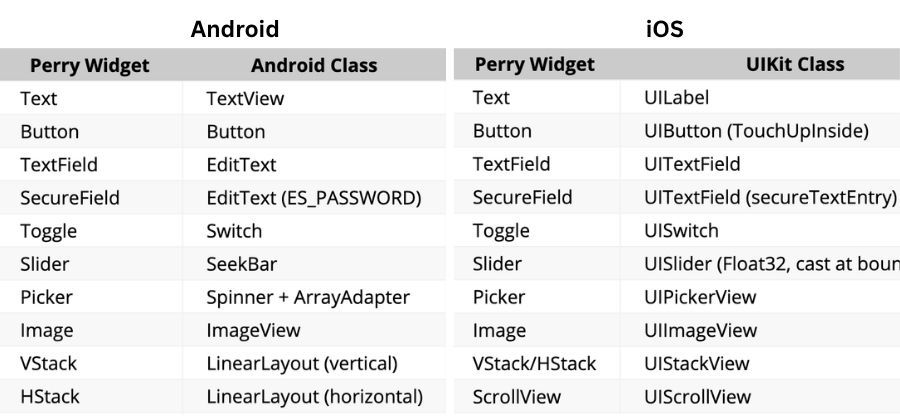
The output is a real native binary. A .ipa for iOS, an .apk for Android, a .exe for Windows, a .app for macOS. Ten platforms in total. No Node, no V8 (Google's JavaScript engine, the one inside Chrome and Node.js), no Hermes, no JavaScript anywhere on the user's device.
Under the hood, your TypeScript is parsed by SWC (Speedy Web Compiler, the Rust-based JavaScript toolchain also used by Next.js) and handed to LLVM (the compiler infrastructure that powers Swift, Rust, and Clang), which emits real machine code for whichever platform you targeted.
Wait a Minute! This isn't React?
No, not yet.
Perry has a separate library called perry-react that lets you write React components and have them render onto perry/ui.
You install perry-react as a dependency, then write your component the way you'd write any web React component. At compile time, perry-react quietly swaps what those imports point to: each JSX button lowers into a Perry Button widget, which lowers into a real UIButton (or AppKit button, or Android Button).
import { useState } from 'react'; import { createRoot } from 'react-dom/client'; function Counter() { const [n, setN] = useState(0); return ( <div> <h1>Count: {n}</h1> <button onClick={() => setN(n + 1)}>+</button> </div> ); } createRoot(null, { title: 'Counter', width: 300, height: 200 }).render(<Counter />);
And here's where the Perry website ends and the perry-react docs begin.
It's Phase 1, macOS only. Hooks are rough, useEffect ignores its dependency array, useMemo doesn't memorise, hook state lives in a global array. className isn't supported, which kills Tailwind, styled-components, and every library that touches the DOM.
Your styling option is inline style={{}}.
Is perry-react a React Native replacement?
Not close. The docs themselves call it "Phase 1 proof of concept" against React Native's "production, 10 years."
But the compiler is real, and the UI layer is real. macOS apps ship on Perry today. perry-react is the bit on top saying "we should be able to write React for these too" and they've shown it works, on one platform, in the simplest case.
So now we have React, compiled to platform-native widgets, with no JavaScript engine on the device.
React, running natively.
Someone should really come up with a name for that…
👉 Perry

Come to App.js Conf and Leave Your Basement
App.js Conf is back in Kraków. If you write React Native for a living, skipping it is a personality flaw. William Candillon, Jay Meistrich, Charlie Cheever and the rest of the cross-platform brain trust, all on one stage, within heckling distance.
Find out what's actually shipping in React Native and Expo before your CTO reads about it on Hacker News. Workshops, deep dives, hallway-track chaos, and a community that can tell the difference between Hermes and JSC without Googling.
Oh… and we'll be there too. Come say hi.
Because you're subscribed, you get 15% off… consider it hush money.
Ticket price goes up in May.

3,000 Lines Sail to Valhalla
Marc Rousavy (aka the React Native dev with the absolute need for speed) just shipped VisionCamera v5, and for once, the headline isn't speed.
It's the absence of a different React Native classic, the silent native crash. The kind that drops a SIGSEGV into your Sentry dashboard at 3 am while your support inbox quietly fills up.
V5 is a full rewrite of VisionCamera on top of Nitro Modules. A type-safe native module framework. About 3,000 lines of handwritten JSI and C++ have been deleted from the camera core and replaced with Nitro-generated bindings.
The release notes phrase it more elegantly:
"bye bye SIGSEGV and SIGABRT", which I say as I light the pyre and wish my brothers a safe journey to Valhalla.
V5 also replaces the old Formats API with a new Constraints API, and the difference matters.
Before, you had to ask the camera, "What configurations do you support?", get back a list of every combination of resolution, FPS, and HDR mode the device offered, and find one that matched what you wanted.
If your Pixel 6a didn't have an exact match for "4K 60fps HDR," tough. You've got to write the fallback logic yourself, or ship a runtime error.
Now you hand the camera a wishlist in priority order:
<Camera device="back" constraints={[ { fps: 60 }, { videoDynamicRange: CommonDynamicRanges.ANY_HDR } ]} />
Higher priority first, lower priority last. The camera figures out the best supported configuration on its own. Can't do 60fps HDR on this device? It falls back to whatever it can do, instead of throwing a runtime error in the user's face on an idle Tuesday.
Photos are also in-memory by default now. In V4, every takePhoto() call wrote a JPEG to a temp file on disk, handed you back a file path, and left you to read it back into memory if you wanted to do anything with it. So it was kind of annoying:
Show a preview? Read the file.
Run it through a filter? Read the file.
Upload it? Read the file.
Every capture meant a round trip through the filesystem before your UI could react.
V5 keeps the photo in memory, so now it's more seamless:
const photo = await photoOutput.capturePhoto({}) const image = await photo.toImageAsync() // in-memory image
Show a preview? Done. Bind it straight to your image view.
Run it through a filter? Pass the buffer in, no I/O.
Upload it? Stream it directly from memory.
toImageAsync() converts a photo directly into a react-native-nitro-image type. You can render it, transform it, or pass it to a frame processor without ever touching disk.
import { NitroImage } from 'react-native-nitro-image' const photo = await photoOutput.capturePhoto({}) const image = await photo.toImageAsync() return <NitroImage image={image} style={{ width: 300, height: 400 }} />
V5 is also modular. The bits you don't need don't ship.
Barcode scanning, location EXIF, the GPU frame resizer, the Skia preview, and the Frame Processor worklets runtime are all separate packages now.
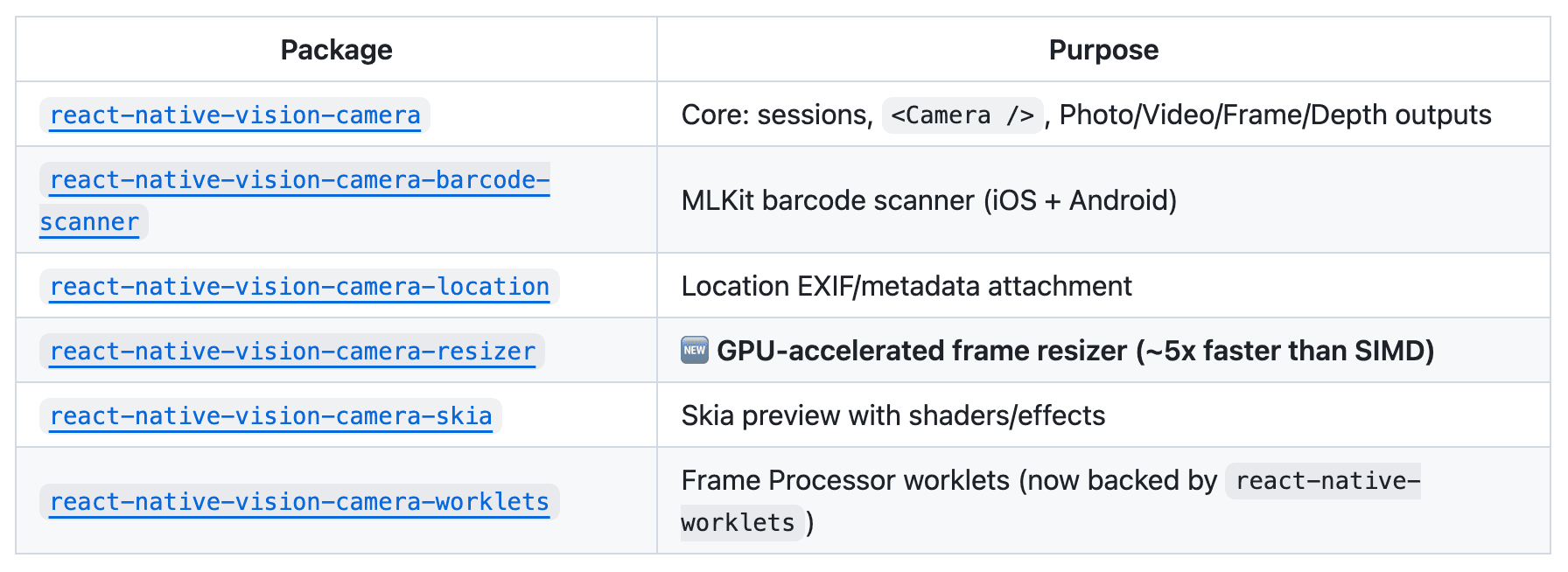
Pick what you use. Ignore the rest.
V5 is a hard rewrite. takePhoto is now capturePhoto. Capture moves from the Camera ref to an Output. Frame Processor plugins are Nitro Modules now, and V4 is no longer actively maintained.
But the payoff is real.
15× faster than Turbo-Modules, and 60× faster than Expo-Modules. Photos that don't touch the disk. Constraints instead of guesswork. Depth streaming, RAW capture, multi-cam, 8K.
All on the new foundation. None of it was possible in V4.
Marc treats his codebase like a track car. Strip the weight. Tune the engine. Send it.

Vogue did this in 1962. We're so back.
React Native has a text problem. It hands strings to the OS, the OS lays them out, and you find out where the words landed when the screen updates. By then, it's too late.
Picture a FlatList of chat messages with varying lengths. You need each row's height up front to virtualise properly, but your only option is to render every row, measure it, then render it again.
Or a paragraph wrapping around a circular avatar, the way every magazine has done since 1962, which you can't do, because text in React Native lives in rectangles.
Each of these is a separate open issue. Italic text clipping has been broken since 2017 (#15114). Ellipsis truncation on Android since 2018 (#19117). letterSpacing does not work (#54823).
expo-pretext is a text layout primitive for React Native. It predicts how tall a paragraph will be before you render it, at sub-millisecond speed (they clock the pure-JS layout arithmetic at ~0.0002ms).
And, optionally, it lets the text flow around arbitrary shapes the way iOS has been able to since TextKit shipped in 2013 and React Native has been studiously ignoring ever since.
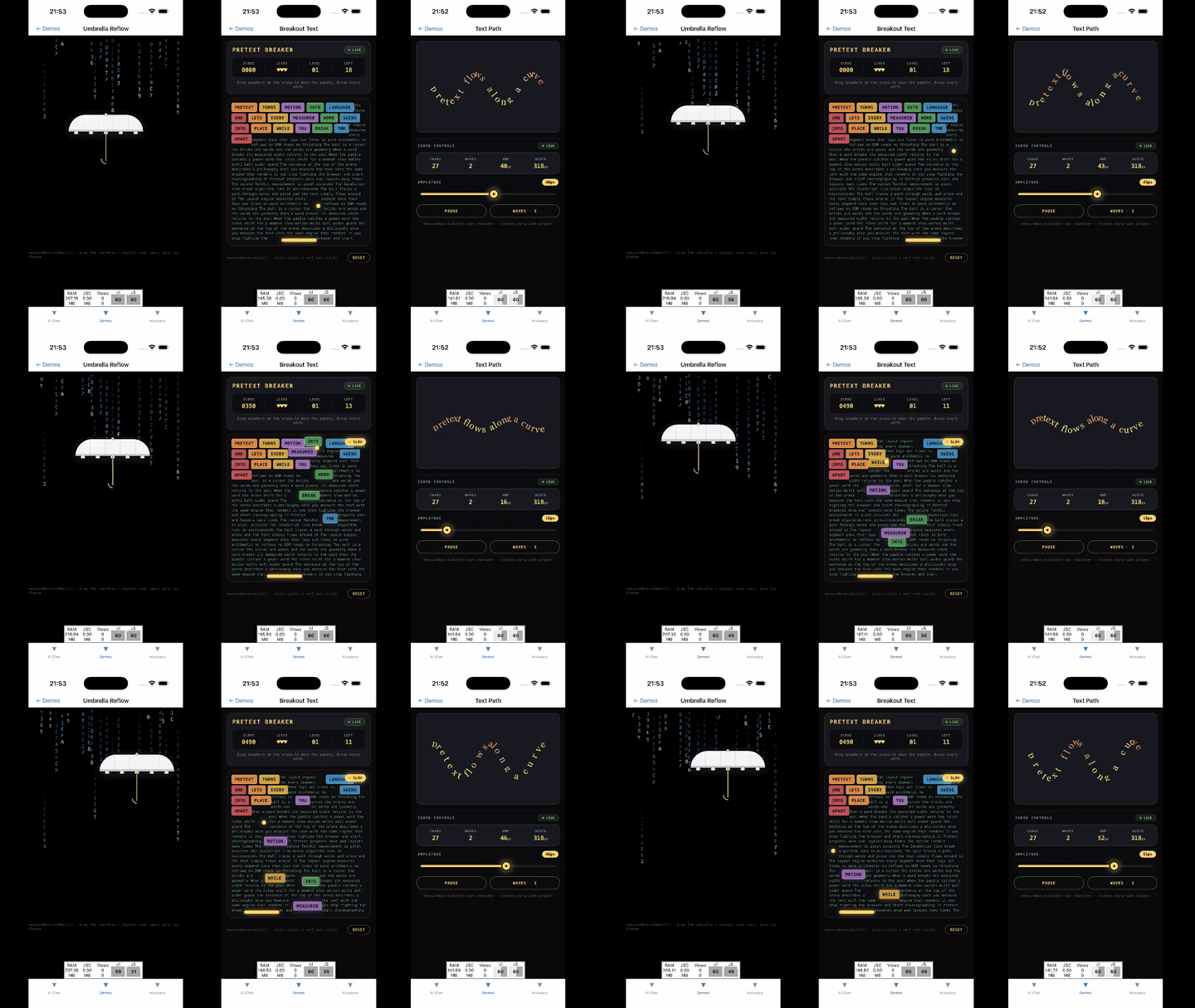
It's by Juba Kitiashvili (@JubaKitiashvili), based on Pretext by Cheng Lou (@_chenglou). The "pre-text" pun being "pre-measure your text", which is the actual hard problem at the heart of it.
The headline API is a hook called useTextHeight.
Hand it text, a style, and a max width. Get back the exact rendered height, before render:
import { useTextHeight } from 'expo-pretext' function ChatBubble({ text, maxWidth }) { const height = useTextHeight( text, { fontFamily: 'Inter', fontSize: 16, lineHeight: 24 }, maxWidth, ) return <View style={{ height }}><Text>{text}</Text></View> }
That's the FlatList problem solved. There's a dedicated hook for it too, useFlashListHeights, which pre-warms a height cache for the whole list in the background so virtualisation JustWorks™.
const { getHeight } = useFlashListHeights(messages, m => m.text, STYLE, width) <FlashList data={messages} renderItem={({ item }) => ( <View style={{ height: getHeight(item) + 20 }}> <Text style={STYLE}>{item.text}</Text> </View> )} />
For the magazine layout, useObstacleLayout takes a column and a list of shapes to flow around, and gives you back positioned lines:
const layout = useObstacleLayout( text, { fontFamily: 'Georgia', fontSize: 18, lineHeight: 28 }, { x: 0, y: 0, width, height: 600 }, [{ cx: 80, cy: 80, r: 64 }], // circular avatar )
Each line in layout.lines knows its own x, y, and text, so you render them as absolutely positioned <Text> elements. No Skia, no SVG tricks, regular React Native components.
There's a hook for streaming AI text that re-measures the AI's reply streams (the way ChatGPT-style responses appear gradually, not all at once), one for pinch-to-zoom that recomputes layout per frame at ~0.0002ms a call, one for typewriter animations, and one for collapsible text.
v1.0 ships drop-in components that close eighteen-plus long-standing React Native bugs in one go. The flagship is <SafeText>, which renders one <Text> per line so React Native has no wrap decision left to make, sidestepping a swarm of Android rendering regressions:
import { SafeText } from 'expo-pretext' <SafeText style={STYLE} maxWidth={width}> {paragraphText} </SafeText>
That single component closes the issues #15114, #49886, #53286, #53666, #56402, and #48921. <TruncatedText> and <InkSafeText> close another nine.
Magazine-style text reflowing around a circular avatar in 2026 shouldn't feel like a breakthrough.
But here we are.