React Native Conference 2024: The Latest Updates from Wroclaw
Hello, developers of Earth! It seems we've made first contact. Our prophet, Dan Abramov, descended upon Wroclaw - Poland, where he unveiled the latest developments happening in both the React and React Native universe. Amongst all the karaoke, open-source rants, and shots shared at the annual React Native Universe Conf, the focus in the React Native world this year was clear… sigh—the new architecture.
So, let’s dive into what went down in React Native at this year’s conference.
React Native 0.76: New Architecture Enabled by Default
As the Children of the Forest wait 6,000 years for React Native 1.0, we mortals have been blessed with version 0.76, set to launch by the end of October. And what's the big headline here? The new architecture is enabled by default. This marks a monumental shift toward a smoother, more efficient development experience… apparently.
But wait, there’s more. Alongside the new architecture, React Native 0.76 will introduce completely revamped development tools. So if you’ve been caught in the eternal battle between Flipper, Redux Native Debugger, and Chrome, your days of debugger chaos are numbered. The React Native team has built **React DevTools (**despite the confusing name, this tool is actually designed for React Native). The features are still limited, but it’s a step toward providing first-class support for debugging.
More time for debugging, less time for fumbling, I guess I’ll have to find another excuse to skip my Pilates class now.
In this release, we'll also say goodbye to iOS 13 and 14 support, and Android’s minimum SDK requirement is getting bumped to Android 7.0 (API 24). You can read more about this decision here for iOS and here for Android.
React Native Firebase: Finally Supporting the New Architecture
In an unexpected yet welcome twist, React Native Firebase now supports the new architecture! This news is music to the ears of many developers who have faced barriers in upgrading due to Firebase. Hats off to Mike Hardy and the team for finally making this transition smoother.

React Native IDE: The Future Go-To for React Native Devs?
If you’ve been keeping up, we mentioned the React Native IDE in our last issue. It’s quietly making moves, and it will support integrated React DevTools, adding yet another tool to streamline development.
Also, you’ll soon be able to launch Storybook stories directly from the editor—no additional setup required. While we were initial skeptic, the IDE is shaping up to be a practical, all-in-one tool that’s slowly proving its worth for React Native developers.
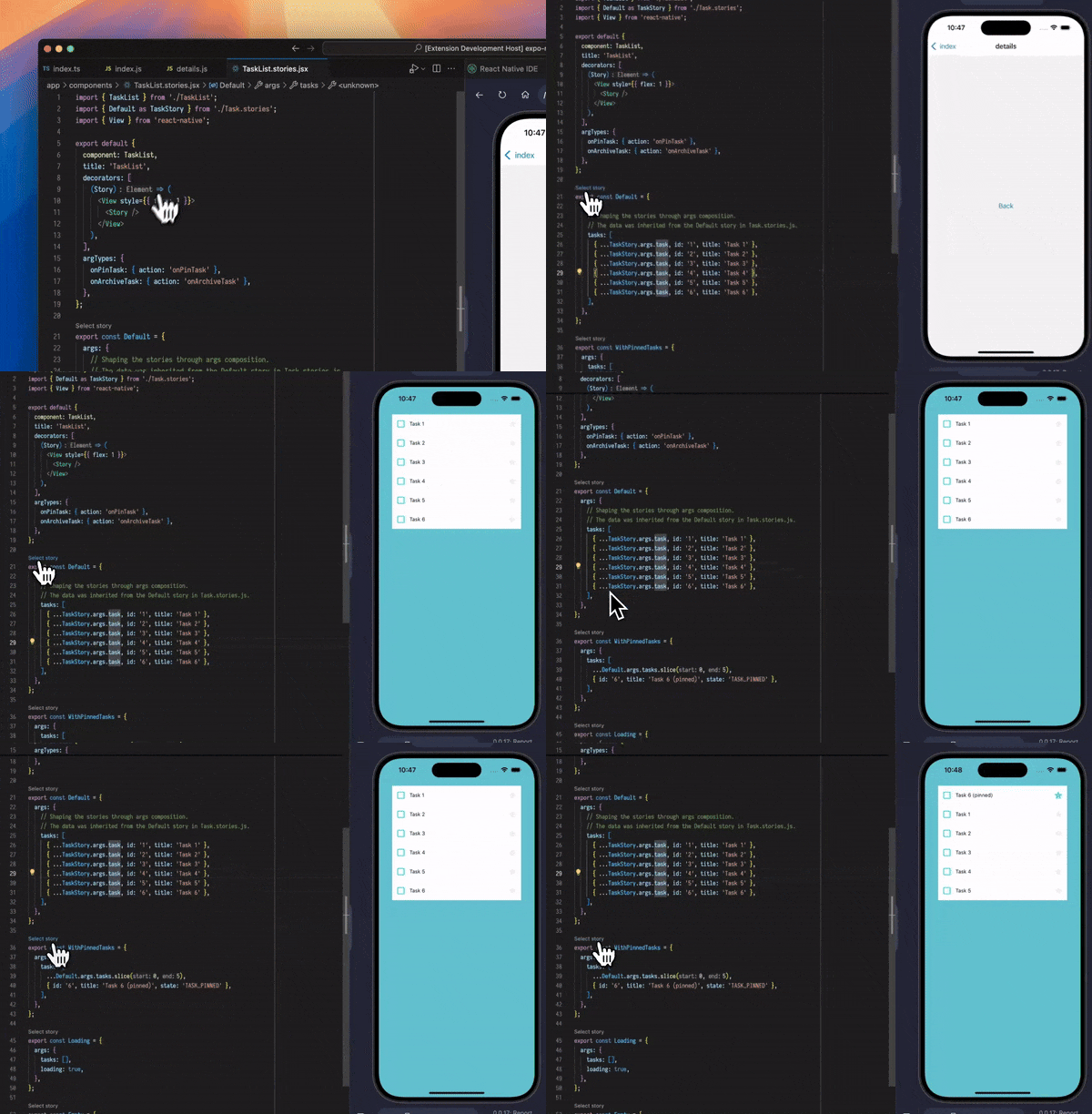
You can see the original tweet or xeet (whatever we call it now) here.

Expo: Docs, Detox, and Maybe a Tesla?
It wouldn’t be a true React Native conference without an update from Expo. While they didn’t release anything earth-shattering, they did update their docs—something many of us rely on to get through the day. These updates point to the evolving direction of the Expo SDKs and their Expo Application Services (EAS) platform.
Did Expo just Drop Support for Detox?
So, I’m not a salesman for Expo Application Services or Athletic Greens, but if I were, I’d probably be driving a Tesla by now. For those who aren’t in the loop, Expo Application Services (EAS) is their cloud platform for building, signing, and deploying your apps, along with other nifty extras like over-the-air (OTA) updates and store metadata management. Detox, for those who live dangerously and don’t typically test their apps, is an end-to-end (e2e) testing tool for building tests on React Native apps.
Now, if you’re one of the brave souls building out Detox test suites, dreaming of the day they’ll run on your CI (Continuous Integration) so you can kick back on the beach, sip a margarita, and tell your boss you're deep into QA testing—well, you might want to hold off on buying that beach chair.
Expo silently archived their Detox test support documentation for EAS, their cloud service. Instead, they’ve shifted their focus to Maestro, a new (I’ve never heard of it) testing tool that’s shaping up to be the go-to solution for mobile testing automation. This shift represents a very different paradigm in how we approach end-to-end (E2E) testing. These impressions are largely based on the silent archiving of the Detox documentation, as no official statements have been made regarding the change.

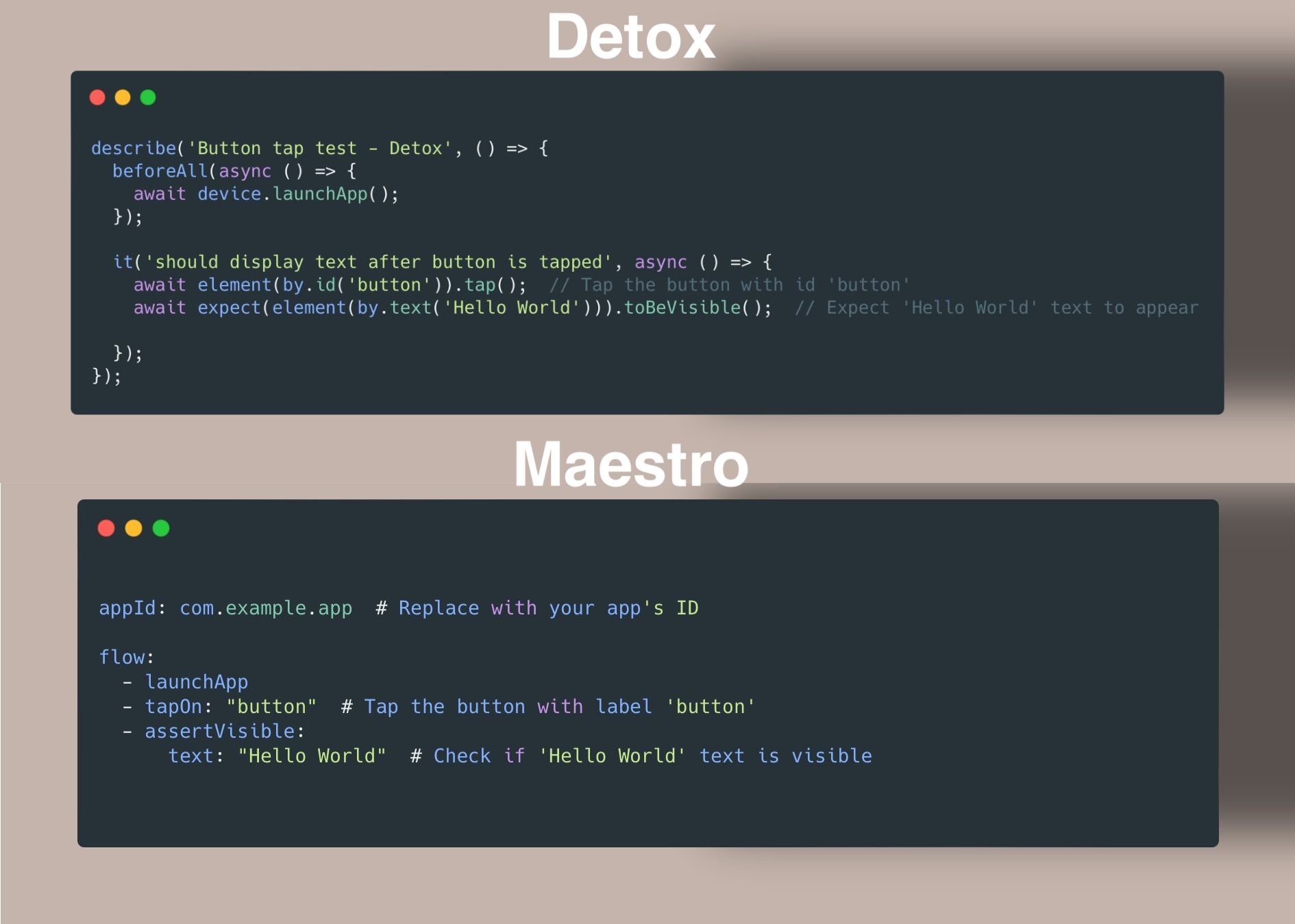
For those deep in the world of Detox, this may change how you approach testing. You can read about Maestro integration in their updated EAS docs.

What the Stars Say About Expo Push Notifications
Yesterday, during a tarot reading, the psychic gazed into the cards and foretold a future. She saw a vision of an all-in-one platform for deploying, analytics, and push notifications—no more makeshift solutions or third-party headaches, just one seamless experience. She didn’t say when, but hinted that the stars—and our build pipelines—would soon align.
Speaking of EAS, push notifications are becoming more integral to the platform, and Expo has been releasing more docs on setting them up. It seems like Expo’s push notification service, combined with their cloud infrastructure, is gearing up to become an even more powerful tool. Keep an eye out for this—I predict there is more to come.
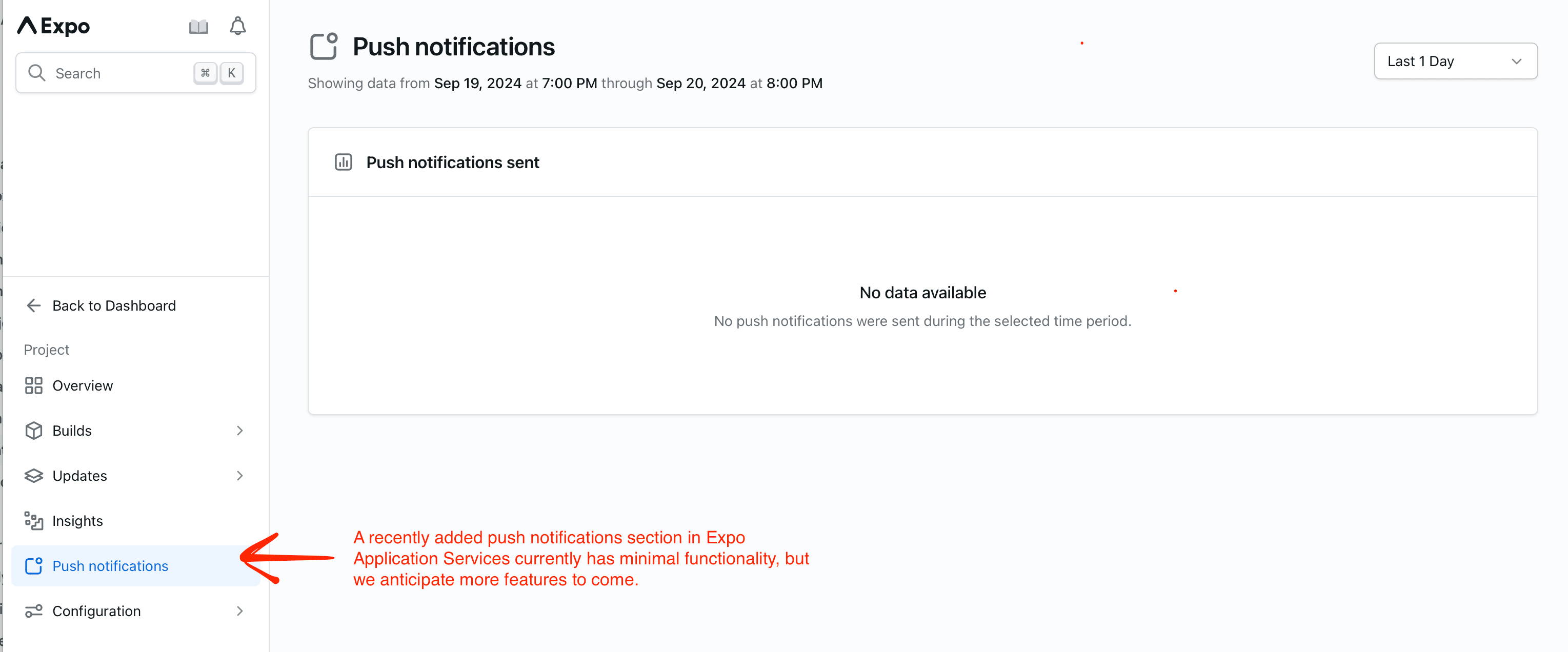
You can find the latest on Expo’s push notification setup here.
Expo DOM Components: A New Way to Embed HTML in Native Apps
With Expo SDK 52, Expo is introducing DOM components, which allow you to render HTML elements directly inside a React Native app using the new use dom directive. Unlike a web view, these HTML components are embedded within the app itself and behave like regular components.
'use dom'; // <- we add this to make it work with React Native export default function DOMComponent({ name }: { name: string }) { return ( <div> <h1>Hello, {name}</h1> </div> ); } } return go(f, seed, []) }
Inside the native component file, import the web component to use it:
import DOMComponent from './my-component.tsx'; export default function App() { return ( // This is a DOM component. It re-exports a wrapped `react-native-webview` behind the scenes. <DOMComponent name="Europa" /> ); }
This feature leverages Expo’s bundler and CLI tools, replacing marked modules with runtime proxies. Though DOM components are slower to parse than optimised native code like Hermes, they can be useful for rendering rich content like markdown or WebGL, where web technology excels. Data between DOM components and native views is passed asynchronously, but native functionality can still be accessed through props.
This is part of a larger trend where Expo is pushing toward a "write once, run everywhere" approach, especially with Expo Router supporting both web and mobile platforms.
Expo visionary Evan Bacon showcased a live demo of this on X. For more, visit the official guide here.

Before you Go
Nitro Modules: Native Modules for Dummies
If you’ve ever built a native module in React Native before the new architecture and thought, “I get this, it’s not too hard,” only to try building one under the new architecture and find yourself lost with C++ classes, jsi:: bindings, and interfaces, then you’re going to love Nitro Modules by **Marc Rousavy.**
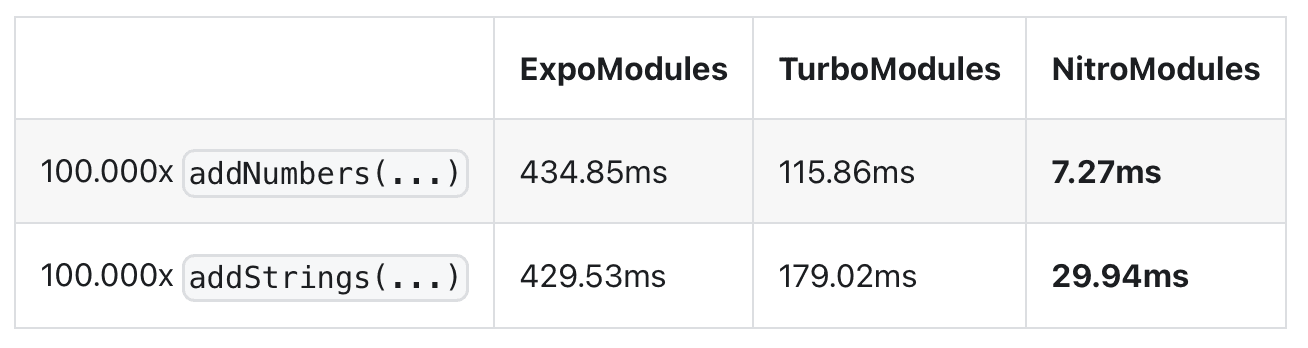
Personally, I am very excited about this library. Not only is the performance 10x better than its counterpart TurboModules (React Native’s native system built on the new architecture) and almost 100x better than ExpoModules:
It will also generate all the C++ interfaces and native protocols using a TypeScript definition as the single source of truth, providing complete type safety between native code and JavaScript at compile time.
For more technical details, check out the project here.
Lottie React Native 7.0: VisionOS Support and More
Lottie React Native 7.0 is here, and it’s packing support for VisionOS, Apple’s futuristic headset. If you remember, last year Callstack released the react-native-visionos package to enable React Native developers to start experimenting with these headsets. With the community rallying behind VisionOS, it seems like we're inching closer to seeing real-world use cases—or, at the very least, all of us walking around looking like Judge Dredd.
In addition to VisionOS support, Lottie 7.0 also requires React Native 0.73+, along with XCode 16. If you’re interested in the details or considering integrating VisionOS into your app, this is definitely worth keeping an eye on.
Now that I have your attention, we have a request. We’re looking for honest and unfiltered feedback on your thoughts about The React Native Rewind. In return, we’ll sponsor your project in the Community Highlights section for the next three months, completely FREE. If you don’t have feedback but enjoy the newsletter, give us a shoutout on X @ReactNativeRwd and you’ll receive the same offer. You can send your feedback and/or your plug to me, the author, at me@lukebrandonfarrell.com or via LinkedIn.
Community Highlights: What’s New?
We love your feedback, and to show our thanks, we’re highlighting your projects! Keep the ideas coming, and we’ll keep sharing your work. Now, here are this week’s plugs:
- For those who’ve turned coding cash into real-world assets—like property, instead of putting it all into Dogecoin like I did—Zeeshan Khan has shared a React Native app called Acreetr. Which we think stands for A Cool Real Estate Experience, Totally Revolutionised. It helps you manage properties, collect rent, and chat with tenants.
- A special shout-out to the brave souls still speaking the languages of Dependency Injection and OOP in the world of React Native. If you're curious about how you can further decouple parts of your application separating dependancies out behind adjustable interfaces, check out Obsidian from Guy Carmeli at Wix for a fascinating take on these concepts: https://github.com/wix-incubator/obsidian.
- Mikita shared a super handy VSCode extension that streamlines your workflow. With it, you can generate files, run React Native commands, and even toggle between dark and light mode in the simulator—all with a single click: https://ide.frostminded.com/
- Ilya shared their app called Topics, which lets you ask AI a question and create a “Topic” (basically a note) that keeps context for later deep dives—no more re-explaining your life story to ChatGPT for the 38th time.
- Marc... welll Marc shared himself: . But honestly, with 15,000 commits in 2023 (that’s 41 commits a day), he’s earned it. According to our rough math, that translates to 8.3 coffees, 58 “it works on my machine” moments and 141 visits to Stack Overflow daily—now that's a lot of caffine.