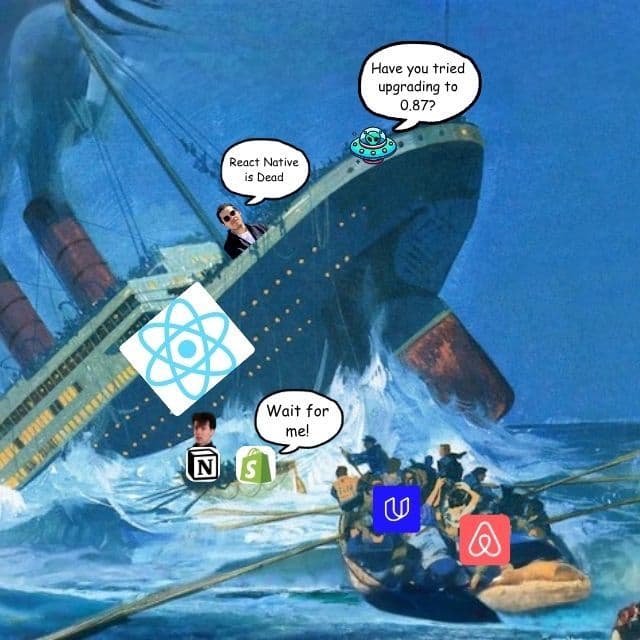

Oy… Oy Sailor!
We hit a… err… iceberg.
And the ship seems to be sinking…
But as every sea captain in every film says…
The captain shall go down with his ship…
So we'll see you at the bottom of the ocean!
You’re reading The React Native Rewind #57.
Shopify Moved Out and Left the Kids With Us
Shopify is leaving React Native.
Not slowly.
The Shop app is already native, rebuilt in Swift and Kotlin and in the app stores 12 weeks after the proof of concept, and the main Shopify app, 300+ screens, widgets and a watch app, ships native later this year.
The reason fits in one sentence, and Mustafa Ali's post says it plainly.
“Building the same feature twice was the cost that made React Native worth it in 2020, and coding agents now do enough of the second build that the cost stopped being the deciding factor”
That is the whole story.
Shopify built an agent workflow called Helix that ports a screen from the React Native code, runs the tests, does a visual review, does an adversarial code review, and moves to the next screen, and Helix turned a 2-year rewrite into a 12-week one.
Meanwhile, Beto published "Is React Native Dead?" within the hour.
For two glorious minutes…
Beto was The React Native Rewind 😂

Oh daddy, give us those clickbaity titles!
Like my dorm room buddy used to say… the fact of the matter is.
Migrations are about 100x easier than they were 2 years ago.
An agent with the old codebase in one tab and the new language in the other does not care whether the destination is Swift, Kotlin, Dart or COBOL, so the language you write your app in stopped being a 10 year commitment and became a setting.
Which cuts both ways, and Shopify's post says so, because the same agents that moved Shop off React Native can move a Kotlin app to React Native.
What should worry you is the furniture.
Shopify paid for a lot of it.
FlashList at 2 million downloads a week, React Native Skia, Restyle, and a serious chunk of the money behind Reanimated.
Restyle is being archived at the end of 2026.
William Candillon is forking Skia under a new name, with Shopify's sponsorship ending in December…
And FlashList gets "critical fixes" while Shopify looks for another company to take it on.
If your app has a FlashList in it, you now own a dependency with no long-term owner.
Shopify left because agentic development reduced the cost of building twice.
Fine.
React Native was never only a way to avoid building twice.
React Native is a UI framework where one component tree renders to UIKit on iOS, Android Views on Android, the DOM on the web, Windows, macOS, Apple TV, Fire TV, visionOS, and whatever screen gets invented next.
An agent can port your app to Swift in 12 weeks.
An agent cannot port your app to 8 platforms and keep them in sync, and neither can Shopify, which is why the native rebuild is 2 platforms and a watch.
The future is not iOS and Android.
The future is every screen, and one component tree that reaches all of them.
React Native is the only thing in the room built for that.
So thanks for the furniture… Slopify.
We'll take it from here.

A Shitaton Of Money is Awaiting You
You have 16 days.
Run, Forrest! RUN!
Shipaton 2026 runs until 30 September, and the requirements are almost insultingly achievable…
Build a brand new mobile app, wire up RevenueCat for at least one purchase or RevenueCat Ads, and get it live on the App Store, Google Play, or the Samsung Galaxy Store.
The prize pool is over $1 million, more than $700,000 of it in cash, spread across categories for games, design, build in public, students, and monetisation, with ShipKit perks thrown in to get you out the door.
Your app folder has been judging you long enough.
One of those projects is closer to shippable than you think.

Wait, Did Hector Zeroni Fork Flutter?
A cross-platform framework can put a button on the screen in two ways.
Ask iOS for one of its own buttons, or paint a picture of a button.
React Native asks.
Politely.
Like a Canadian.
Every <View> in a React Native app becomes a real UIView on iOS and a real Android View on Android, and React Native's job is to create those native views and update them when your state changes.
Flutter paints, like my 4-year-old, who also has no idea what she is doing.
Flutter draws every pixel of your app with its own rendering engine, Impeller (Flutter's GPU renderer), so a Flutter button looks like an iOS button, but iOS never knows a button is there.
For years, the two camps have argued about which way is right…
Mostly on X, mostly at 2 am, mostly with benchmarks nobody can reproduce.
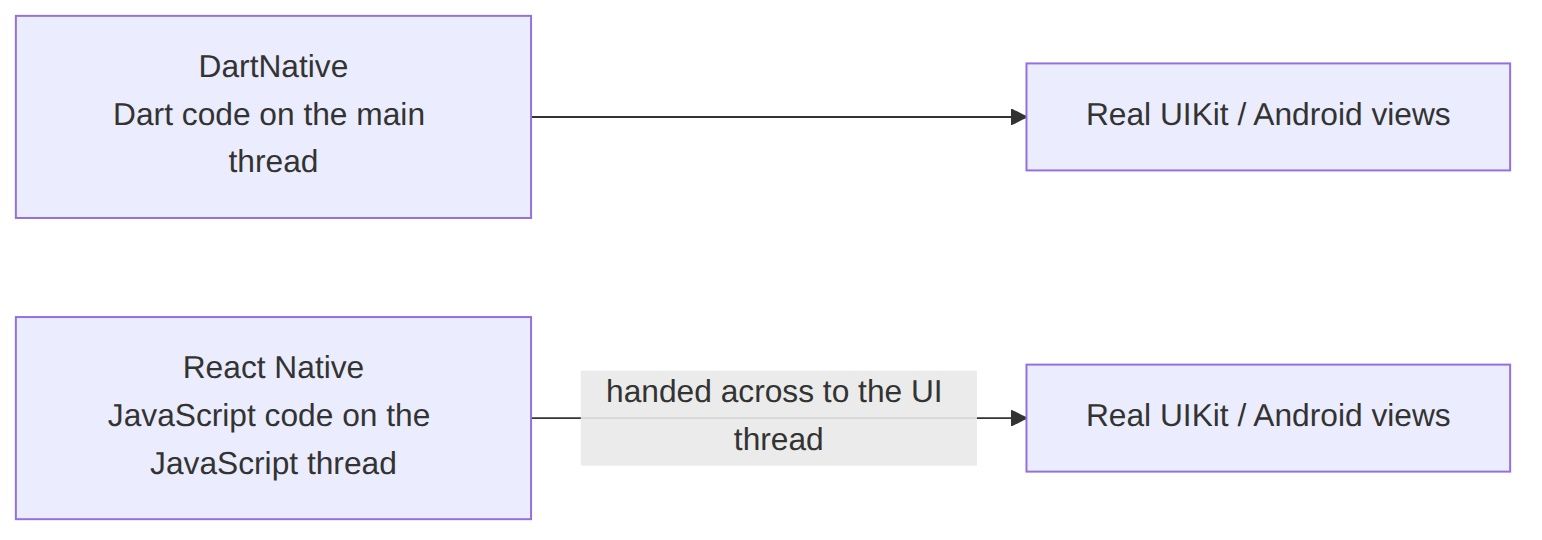
DartNative is a new framework for Flutter developers, written in Dart, that draws nothing itself and uses the platform's own views, like React Native.

DartNative keeps Flutter's code and throws Flutter's renderer in the bin, where it belong…
So every widget becomes a real native view, which is React Native's model with the JavaScript taken out.
If you have never written Flutter (congratulations on your life choices), a Flutter widget is the Dart equivalent of a React component, and a Flutter app is a tree of widgets the same way a React Native app is a tree of components.
DartNative takes those widgets unchanged.
final counter = signal<int>(0); Widget build(BuildContext context) { final count = counter.watch(context); return Text('$count'); }
In Flutter, the Text widget in that snippet is drawn by Flutter itself, pixel by pixel, into one big image that covers the whole screen, so iOS sees one view and has no idea there is any text in it.
In DartNative, the same Text widget becomes a real UILabel on iOS and a real TextView on Android, every ListView becomes a real scroll view, and every TextField becomes the platform's own text input.
So how does Dart code drive UIKit?
DartNative runs on Zero, and no, not Hector Zeroni, its own fork of flutter_zero by Matej Knopp (@MatejKnopp), which is the Flutter engine with the renderer removed and Dart moved onto the platform's main thread, the same thread UIKit uses to draw.
Flutter has its own layout system, and DartNative replaced Flutter's layout system with Yoga, yes, the same Yoga as React Native.
In React Native the same update happens on two threads.
React runs on the JavaScript thread, Fabric lays out the shadow tree (the C++ copy of your view tree that Fabric measures before touching any real view) with Yoga on the JavaScript thread, and then hands the finished tree to the UI thread to mount onto the native views.
So every frame, the finished layout has to be handed from the JavaScript thread to the UI thread before anything on screen can change.
DartNative has no JavaScript thread, so nothing is handed between threads.
Now you may be asking…
Is DartNative faster?
DartNative does not know.
The architecture page gives 4 reasons it should be.
Native machine code instead of Hermes bytecode, no thread boundary, a tap that becomes a view update in the same frame, and a list fling that never enters Dart because FastList is a real UITableView underneath.
And then says, in their own words, that they don't publish comparison numbers they haven't measured with a stated device and method.
Not one benchmark against React Native.
Which is either admirable restraint or a framework that has not yet run the test it is worried about.
Also, there is a catch.
There is always a catch, my dudes!
DartNative is proprietary.
The framework is developed in a private repo, and the public repo holds the docs, a playground app and tutorials, and the license forbids modifying, redistributing or reverse engineering the framework.
The free Community tier covers one production app (an app with 1,000 or more installs), the Standard tier is $49 a year for unlimited apps, and the Pro tier is $99 a year with more CodePush installs a month.
Congratulations to Flutter developers on discovering React Native…
11 years late and $49 a year.

Native Modules: Just Add Water™
React Native runs your app in JavaScript.
Duh.
Apple and Google, in their ongoing commitment to making our lives easier, didn't write the camera, bluetooth, or video playback APIs in JavaScript.
Those APIs are in Swift and Kotlin.
A native module is the Swift or Kotlin code you write so your JavaScript can call one of those APIs.

Expo Modules is Expo's toolkit for writing native modules.
You write the native code...
Fine! Claude (@claudeai) writes the native code, and you write "looks good", or even “lgtm” in the PR, depending on how much your posture has decayed in your chair while watching your agents work.
And Expo Modules converts JavaScript values into Swift types, runs your function on the right thread, and plugs the module into the app's lifecycle.
In Expo Modules 1.0, you write your Swift function, then you describe the same Swift function a second time inside a definition() block, so Expo Modules 1.0 knows which functions to expose to JavaScript and what their argument types are.
public final class MyModule: Module { public func definition() -> ModuleDefinition { Name("MyModule") Function("add") { (a: Double, b: Double) in return a + b } AsyncFunction("fetchValue") { (key: String) in return try await store.read(key) } Property("ready") { return self.isReady } } }
Everything inside definition() repeats what the Swift function underneath already says.
Writing definition() costs you time at the keyboard, and definition() costs you time again on every call from JavaScript, because Expo Modules 1.0 only reads the argument types inside definition() while the app is running.
Which brings us to Expo Modules 2.0, previewed by Tomasz Sapeta (@tsapeta) at Expo (@expo), which removes definition() entirely.
Expo Modules 2.0 introduces decorators (an @Name you put above a class, function or property; the same idea as a TypeScript decorator, except Swift runs the decorator at build time and calls the decorator a macro).
In Expo Modules 2.0, you put the @ExpoModule decorator on the class, and the @JS decorator on every function or property you want JavaScript to see, and Expo Modules 2.0 reads the function name, the argument types, and whether the function is sync or async from the Swift you already wrote.
@ExpoModule public final class MyModule { @JS func add(a: Double, b: Double) -> Double { return a + b } @JS func fetchValue(key: String) async throws -> String { return try await store.read(key) } @JS var ready: Bool { return isReady } }
Removing definition() is also what makes every call from JavaScript into Swift faster.
Expo Modules 1.0 only finds out your Swift function's argument types while the app is running, when JavaScript calls the function.
So on every call, Expo Modules 1.0 wraps the incoming arguments in an allocated, reference-counted container, runs each argument through a dynamic type converter into an [Any] array (a Swift array that can hold values of any type), and builds a tuple, before Expo Modules 1.0 can finally call your Swift function.
Every call, even add(a, b).
Expo Modules 2.0 does the type work at build time instead.
The @JS decorator reads your function signatures while the app is being built and generates the Swift that converts each argument, so the generated code already knows the type of every argument, reads each argument right where the JavaScript runtime put it, and converts each argument straight into its Swift parameter.
Their own benchmark, measured on an iPhone 16 Pro in a Release build as the total time for 100,000 calls, puts a sync no-op call at 52ms on SDK 57 with Expo Modules 1.0 and 9ms on SDK 57 with Expo Modules 2.0.

There is also an expo-migrate-module skill that lets your coding agent migrate a module's Swift side from 1.0 to 2.0 while leaving the JavaScript API alone.
Views are next.
If you didn't know, Expo Modules can also expose a native view (a UIView on iOS, rendered inside your React tree the way a third-party <MapView> is), and Expo Modules 2.0 does not support views yet.
When views land, a view will be a class marked @ExpoView, with its props and event callbacks declared once in a @ViewProps struct, instead of being declared on the native view and then declared again in a hand-written TypeScript prop type.
After the views generate TypeScript, since every @JS function already carries its types in the Swift signature, a tool can generate the module's TypeScript declarations from the Swift.
If reading the types once and generating the rest sounds familiar, Nitro Modules by Marc Rousavy (@mrousavy) from Margelo (@margelo_io) has been doing the same thing since 2024, in the opposite direction, from a TypeScript spec into Swift.
Nitro Modules is also the one native module system missing from that benchmark chart.
Somewhere in Vienna, the Callstack office in Wrocław…
Marc Rousavy of Margelo is opening a pull request titled:
"Add Nitro to the benchmark, please!"