

We were at Agent Conf in Warsaw last week…
Hanging out with the Callstack team and vibe coders vibe engineers.
We came home with ideas… so… here we go…
Lately, every other section in this newsletter has had the word "agent" in it.
We love that stuff, but this is The React Native Rewind.
And we want The React Native Rewind to stay about React Native.
So we're starting a second newsletter… drumroll…
Oh yeah…
We just did that.
This means The React Native Rewind goes back to being 100% React Native.
We're also adding a new section at the bottom of every issue, with links like these…
You still get the deep-dive write-ups, and now you also get the full picture of what happened in React Native last week.
So… you know…
You can now unsubscribe from your usual shopping list.
You’re reading The React Native Rewind #58.
I Only Want to Read One DAMN File!
You have probably seen I Am Legend... the one where Will Smith hunts for a cure for a zombie virus in a post-apocalyptic New York.
Well… our legend has nothing to do with that.
Although he is also trying to find a cure… for slow software.
That legend is Jay Meistrich.
And he just built a code editor…
Wait… did you say, code editor?
Yes… we said code editor.

Now, why in the hell would Jay Meistrich build a code editor?
Well… with new AI tools, he saw a gap in our workflows.
We also saw the gap, but Jay is just so fast (like his software)… what can you do 🤷
So what is the gap?
Well… sometimes you just want to open a damn file and look at some code… God forbid!
But opening a file in Cursor, Claude, or Codex gives you a full agentic UI where you have to go searching just to find the source code of your project.
So what about a ridiculously fast code editor built to simply view single files?
You may say, well, that is just too simple…
But simple is the point.
A fast and simple code editor is great when you just need to add an MCP server to a JSON config or bump a version number in package.json, and don't want Fable spending 20 minutes running Python scripts to change a single line.
So, if you are like us and have uninstalled your code editors…
Or all your editors have turned into full agentic suites…
Then you may want to set Legend Code as your default editor.
Which is what we did, and on a Mac it goes like this.
First, install duti (a tiny command-line tool for setting default apps, because macOS gives you no way to do this in bulk).
brew install duti
Then point every code-ish file type at Legend Code in one go:
for t in js jsx mjs ts tsx json yml yaml toml md txt \
  css scss sh zsh py rb go rs java kt php sql xml \
  env gitignore
do
  duti -s so.legend.code.macos "$t" all
done
Now… If you double-click a JSON file, it just opens in Legend Code.
Add whatever extensions you care about to that list above.
The reason we need to do this is that Legend Code's Info.plist only claims public.text, so macOS never even considers it for .json or .ts, and Xcode quietly wins by default.
Which honestly… is very humble, Jay.
But we can fix this… by tweeting @jmeistric.
Fly, my pretties, fly!
Ee-hee-hee-hee! (witch cackle)

The biggest screen in the house runs your stack
Registration is open for the Amazon Developer virtual hackathon.
Build for Fire TV with React Native and take a swing at a $40,000 first-place prize.
Amazon Developers is after demo-ready Fire TV apps on Fire OS and/or Vega OS, built with React Native, web, or Android frameworks.
There are multiple primary tracks plus mini challenges, giving you more than one way to bring your idea to the hackathon.
Build for AI-enhanced viewing experiences, sports, fitness, family entertainment, multi-modal UX, computer vision, and whatever you can get a crowd to call innovative.
Submissions are open until October 23, with weekly office hours along the way...
And you can enter solo or finally hold every friend who's said "we should build something together" to it.
And potentially haunt a few hundred thousand living rooms with your very own JavaScript.

Swipe Right on My Pull Request, Please.
Are you sick of pull requests that just contain text?
Boring!
C’mon, at least you can write a poem or something. Sheesh!
Or… a selfie of the moment you pressed push…
If you are looking for something to spice up your love life…
Well, this is not it…
But if you are looking for something to spice up your pull requests.
Then you can check out Screenmap.
So… what is Screenmap?
A map on my screen so I can finally find that goddamn tiny mouse Apple sets as default?
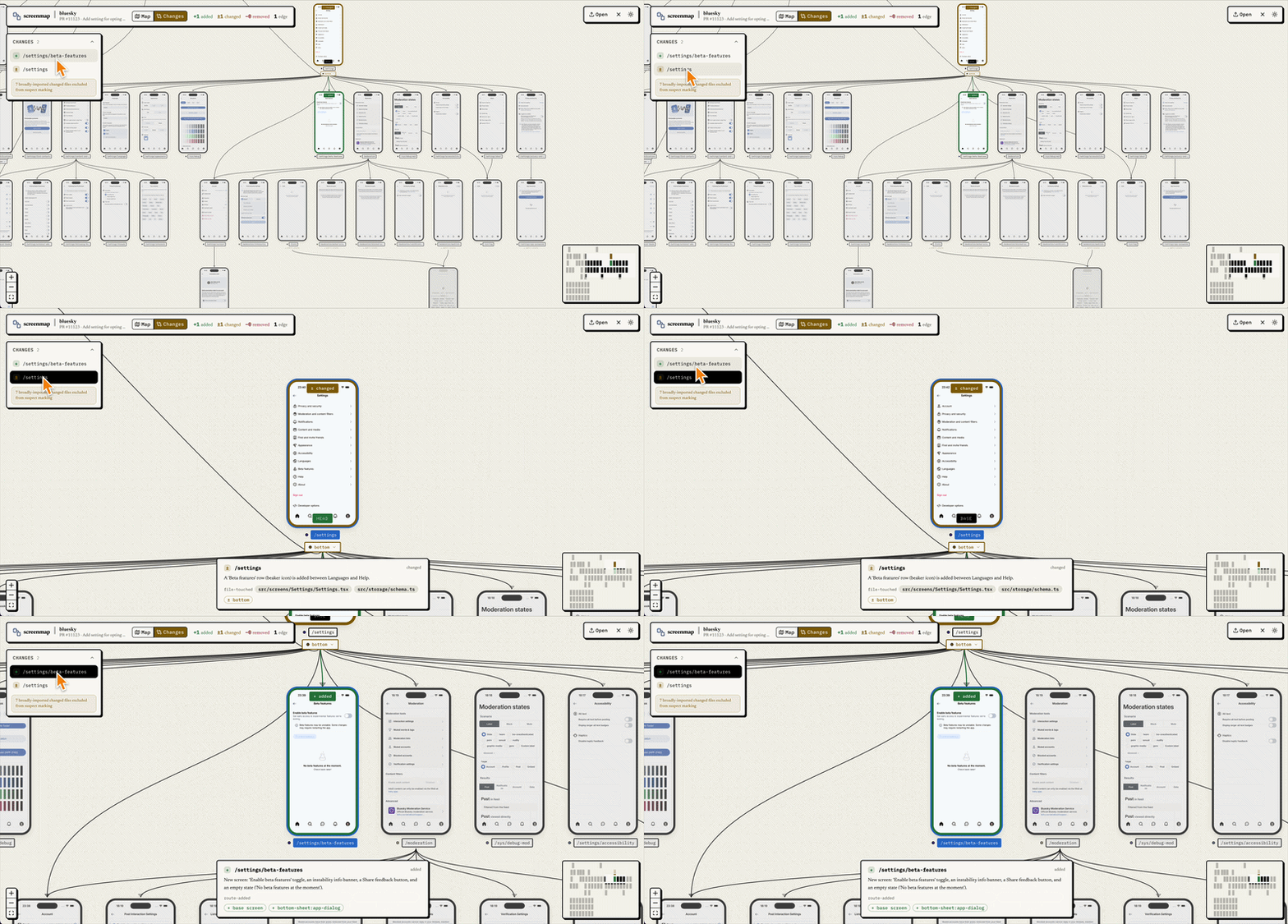
No... Screenmap puts every screen of your Expo or React Native app on one map, then shows your reviewers exactly which of those screens a pull request changed.
Screenmap is the creation of Aleksander Mikucki (@aleqsio) and operates within your GitHub Actions.
To set up Screenmap, you need to copy two workflow files into your repository.
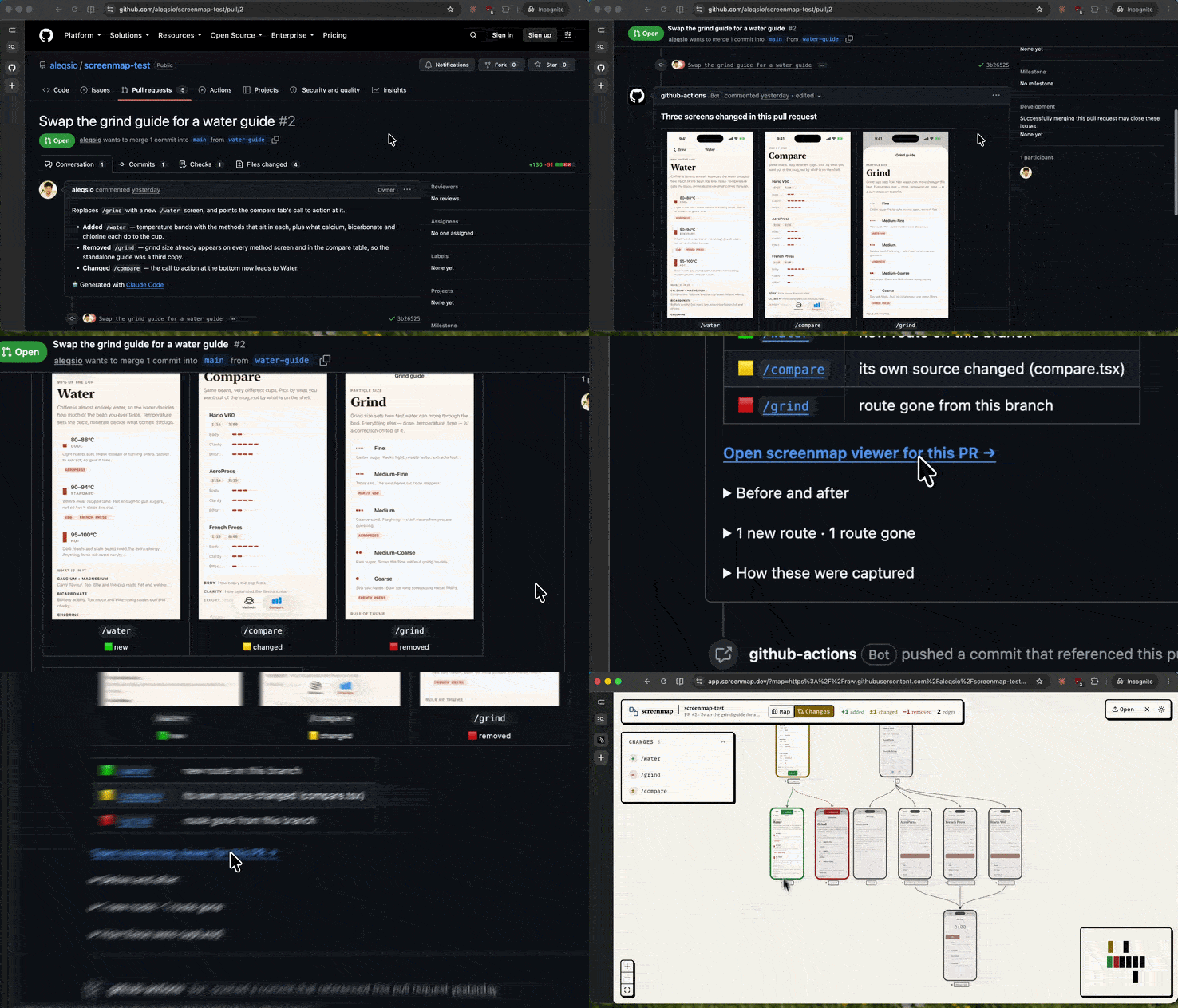
From that point on, whenever you open a pull request, the GitHub Action used by Screenmap will start a build of your app on an iOS simulator and take screenshots of only the screens that your changed files can access.
Screenmap posts a comment on the pull request showing the screens before and after the change, and drawing a box around the parts that changed.
So how does Screenmap know which screens to screenshot?
Screenmap parses your expo-router files or your react-navigation route map, so the list of screens comes from your code, and Screenmap picks up the links between screens from every Link and navigate() call.
Next, Screenmap has to open each of those screens on a simulator.
Usually, most screens open with a deep link (a URL like myapp://settings that jumps straight to one screen), which Screenmap fires with Apple's own simulator command, simctl.
But… in the odd case… there will be screens without a URL, such as a modal.
The first time Screenmap meets one of those screens, a coding agent (Claude Code by default) taps through the app using Software Mansion's Argent (a toolkit that lets a coding agent tap, swipe, and screenshot inside the iOS simulator).
Once a screen is open, Apple's simctl takes the screenshot, whether the screen arrived by deep link or by Argent.
Screenmap still can't spice up your love life...
But for the first time ever, someone is actually going to look at what you've been working on.

Expo SDK 58 is in beta, and targets iOS 27, where an iPhone app's window can change size while the app is open (mainly for iPhone Duo, Apple's first foldable).
Any code that reads the screen size once at startup will break when the window resizes. The beta also adds expo-app-intents (Siri, Shortcuts and Spotlight support) and @expo/agent-cli for coding agents.
Expo Modules 2.0, shared by Tomasz Sapeta (@tsapeta), we talked about them in issue #57, meaning you can now create modules in Swift and Kotlin using a @JS marker (an annotation you put above anything JavaScript should see), and they also came with speed increases, with Expo benchmarking reporting a call went from 97ms to 19ms.
React Native is moving closer to the DOM (Document Object Model), as it has been for the last few years, as the inevitable merging of native and web continues. In React Native 0.88.0, get a new event API adding addEventListener, removeEventListener, and dispatchEvent to align with the browser.
Reanimated 4.7 swaps in a new engine for layout animations (the entering, exiting, and layout animations you put on views), built on the same code as Reanimated's shared element transitions.
📦 react-native-screens 5.0.0-alpha.3
Yet another library adding Swift Package Manager support. React-native-screens 5 Alpha 3 adds options to the header bar at the top of each screen in Stack v5 such as subtitles, custom tile fonts, and background colours on Android, back button titles and long press menus on iOS.
On Android, opening a sheet on top of another sheet now behaves like iOS, so closing the lower sheet also closes the ones above it, and the background no longer gets darker with every sheet you open.
React Native Skia by William Candillon (@wcandillon)… I guess, for what it’s worth, as who knows the future of React Native Skia since Shopify decided to ditch us, which we covered in issue #57. Now Skia supports SPM (Swift Package Manager) on iOS, making it the third library to add SPM in the last week.
Voltra widgets can now fetch data from your server on a schedule, even when your app is closed. On Android, each copy of a widget can also have its own settings, so two weather widgets on the same home screen can show London and New York.
Live Activities can also update from small JSON payloads instead of a full re-render, with hot reload while you build, though that part is experimental.
📦 agent-device and the iPhone Duo
agent-device is probably one of the fastest-iterated libraries right now.
Michał Pierzchała (@thymikee) has shipped six releases in the past 8 days, from 0.21.3 to 0.21.8. The headline is in 0.21.8, which can fold and unfold Apple's iPhone Duo simulator through Xcode 27's Device Hub, so an agent can test how your app handles the fold.
Along the way, agent-device learned to press the iPhone Action Button, type into the Apple Pay sheet, and refuse taps that would land behind the keyboard.
If you like detecting faces, such as faces of Bill Gates, let’s say it’s a hobby… or you have a more serious need for face detection, then expo-face-vision by Rizky Bayu Oktavian (@rbayuokt) is a package for face detection, auto-capture, KYC liveness checks (proving a real person is in front of the camera during identity verification) and Face ID-style scans.
Marc Rousavy (@mrousavy) has created a new type, not the first time… called LazyJSON for Nitro. JSON.parse turns an entire JSON string into JavaScript objects in one go, and blocks the JS thread while it does it.
LazyJSON parses the JSON on a small background runtime instead, which Marc says cuts JS blocking time by about 33% for any Nitro module that returns or accepts JSON.
There's no public code yet, so for now LazyJSON lives on Marc's machine.
📝 You don't need a Mac to develop iOS apps
We covered EAS Simulator in issue #56, but Rami Maalouf (@rami__maalouf) did a deep dive on the Expo blog. Essentially, it’s a new cloud service that gives every developer and coding agent an iPhone simulator in the cloud; it’s probably expensive.
Thanks to @anisha_malde for coining our new dance…
Signed: “The Rewind”